4.2.14-x
2026-10-26 | 4.2.14-1 POS
The information provided below includes the user experience, process workflow, and infrastructure improvements and updates for this production version of POS API and UI.
Refer to change tickets: CHANGE-15724, CHANGE-15800, CHANGE-15827, CHANGE-16033, CHANGE-16121, CHANGE-16196, CHANGE-16249, CHANGE-16296, CHANGE-16346, and CHANGE-16468 when speaking with a team member about this release.
New Features
PRMA-6439, POS-55978, POS-55999, POS-56464, POS-58834 | Added ability to support Fundraiser Events and report sales associated with Events. Permissioned users can Add, Replace, and Remove a Fundraiser Event from orders from the Options menu in Order History. | |
PRMA-7079, POS-56804 | Print labels to track the lifecycle of raw food items used in product prep. | |
PRMA-7140, POS-56898 | Optionally require POS users to scan or type the discount code to apply specific discounts to orders. |
Improvements
POS-47543 | Claim / Complete Item Updates | If order item is added via quantity increase, the Claim / Complete indicator is not displayed for the new item regardless if the original item is already Claimed / Completed. |
POS-54413 | Printing | Technical improvement to cancel pending requests for destination printer when user selects Cancel from prompt. |
POS-57687 | Online Orders | Technical improvement to business date and POS EOD order processing to ensure accurate order reporting and synchronization between Genius and MacromatiX. |
POS-57796 | Order Cards | Updated Custom Order Cards to ensure Customer Name variables are populated correctly. |
POS-57970 | Loyalty and Online Orders | When a Loyalty customer is identified and the online order is resumed, the saved destination and vehicle information is persisted. |
POS-57971 | Taxes | Sum of item-level taxes and discounts matches the order-level value as expected. |
POS-58079 | Gift and Loyalty | Technical improvement to timeout of Gift Card UI at POS. |
POS-58123 | Customer-Facing Display (CFD) | Technical improvement to CFD response in Kiosk Mode. |
POS-58131 | Business Date | Technical improvement to business date assignment for orders created by Pipeline. |
POS-58153 | Payment Device | Technical improvement to DNS queries on Verifone P400 connected via USB. |
POS-58181 | Gift and Loyalty | POS recognizes Loyalty QR Code and sends Identify Customer request to Gift and Loyalty regardless of order state. |
POS-58274 | Gift and Loyalty | When a restricted payment type is selected, the Amount Paid value is updated to match the Eligible Amount as expected. |
POS-58350 | Bundle Components | When Unavailable Items Display is enabled for a Modifier Group, the button for unavailable menu items is hidden on the Bundle Component tab. |
POS-58440 | Bundle Components | The ‘Show More’ selection behavior configured for a Menu Item Group is respected when Menu Item Group is a bundle component. |
POS-58613 | Clock In | Technical improvement to timer when employee Clocks In after scheduled time. |
POS-58760 | Printing | Technical improvement to receiver-terminal concurrency to ensure expected printers are included in terminal printer list. |
POS-58761 | Credit Cards | Orders with Partial Credit Approval are updated on reports and the iMin/Moby as expected. |
POS-58788 | Online Orders | Technical improvement to Queue Time in relation to Saved and Paid online orders. |
POS-58847 | Order Explorer | Technical improvement to order number incrementation. |
POS-58861 | Printing | Technical improvement to TCP connection for kitchen printers. |
POS-58866 | Business Date | Technical improvement to address POS business date advancement at EOD. |
POS-58891 | Payment Device | Technical improvement to address open order after payment applied via Verifone device. |
POS-58895 | Customer Details | Update to not allow order save until user provides all required customer details. |
POS-58897 | Performance | Technical improvement to HTTP requests for config settings and data initialization. |
POS-58949 | Online Orders | Technical improvement to message processing to ensure the order state of Online Orders is updated and persisted as expected. |
POS-58952 | EBT Tax | Technical improvement to map EBT TANF benefit to EBT Cash and make it taxable. |
POS-59089 | Online Orders | Technical improvement to eliminate dependency of payment void on reference_id value in database. |
PRMA-3761, POS-57423 | In-Store POS API Service | In-Store POS API Service update:
|
PRMA-4161, POS-3825 | Serial / USB Coin Dispenser | POS supports Serial / USB Coin Dispensers including the Telequip TFlex Coin Dispenser. Use Peripherals in Data Management to configure specific devices. |
PRMA-5555, POS-47828 | Suite Catering Account Discounts | POS supports discounts applied to orders for Suite Catering accounts. |
PRMA-6845, POS-56941 | Require Manager Approval to remove items from an order other than the most recently added item. The removed items are identified as Voided. | |
PRMA-6959, POS-58132 | Loyalty and Online Orders | Upon order completion, the user is returned to the screen where order was initiated. |
PRMA-7037, POS-55850 | Added ability to change printing configuration in suites for specific event. | |
PRMA-7125, POS-58059 | Updated quantity rounding rules for Summary section to accommodate fractional quantities. | |
PRMA-7138, POS-56383 | Bundle Components | Optionally limit bundle component choices to one (1) to prevent POS user from adding multiple instances of a product that is non-quantifiable. Bundle Component Options in Data Management now includes the following:
|
PRMA-7421, POS-57473, POS-57646 | TouchNet FIS Integration | Touchnet consumes orders/transactions via Data Stream. |
PRMA-7573, POS-57470 | Permissioned users can edit employee time punches for the current business date from the POS. | |
PRMA-7650, POS-57757 | Global Payments Android SDK → Portico | Define unique Device ID for Moby 5500 peripherals. |
PRMA-7685, POS-57802 | Updated POS to reference the Serial Number to distinguish between USB printers connected to the same terminal. This ensures each printer performs its respective functions on startup. |
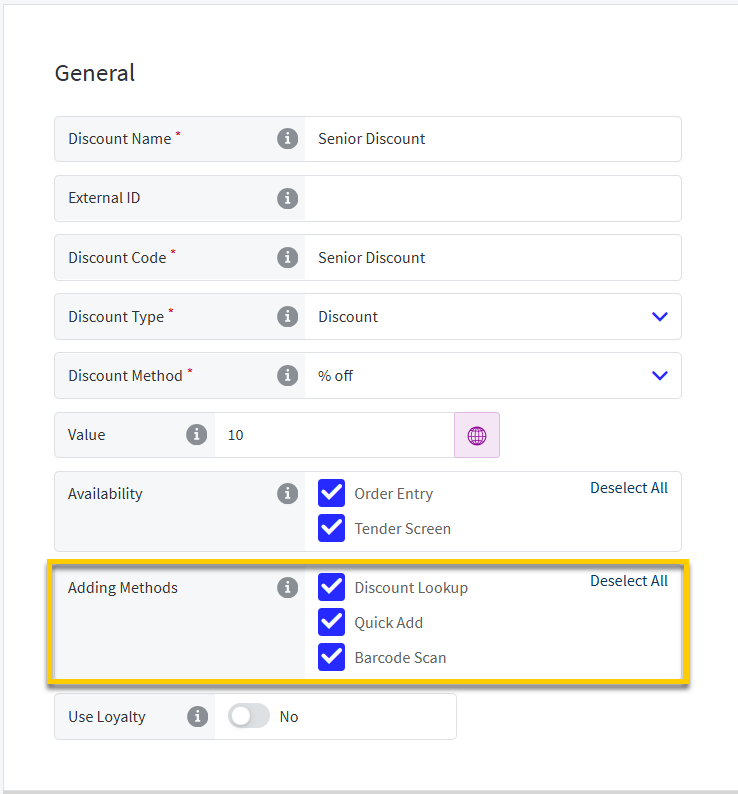
Optionally require POS users to scan or type the discount code to apply specific discounts to orders.
Discount List in Data Management now includes an Adding Methods field. Select the methods that POS users are allowed to use to apply this discount.
 |
Permissioned users can edit employee time punches for the current business date from the POS.
Data Management
From the Ordering Application → Time and Attendance section of Company/Site Preferences, define the following:
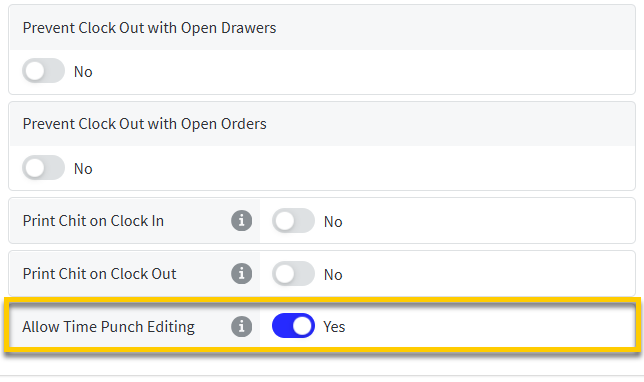 |
Allow Time Punch Editing - Allow permissioned user to edit employee time punches from the POS
From the General page of the Workflows editor, define the following for the Employee Shifts Task:
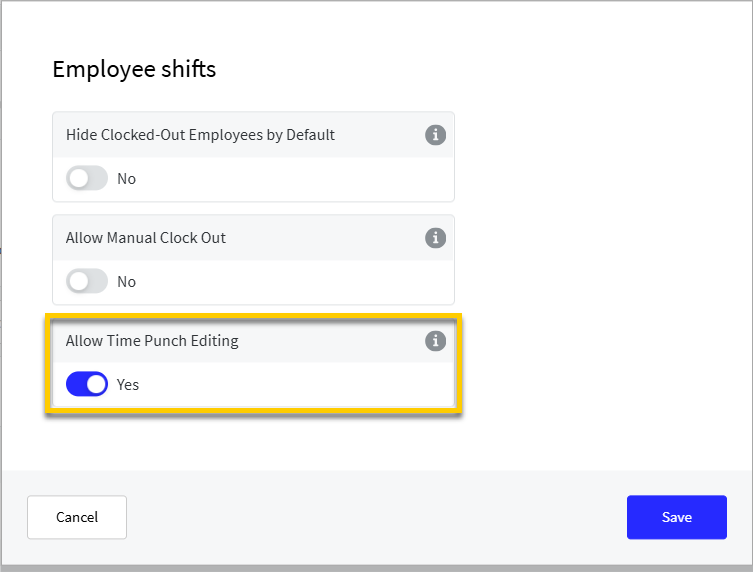 |
Allow Time Punch Editing - Allow permissioned user to edit employee time punches from the POS
Genius Point of Sale (POS)
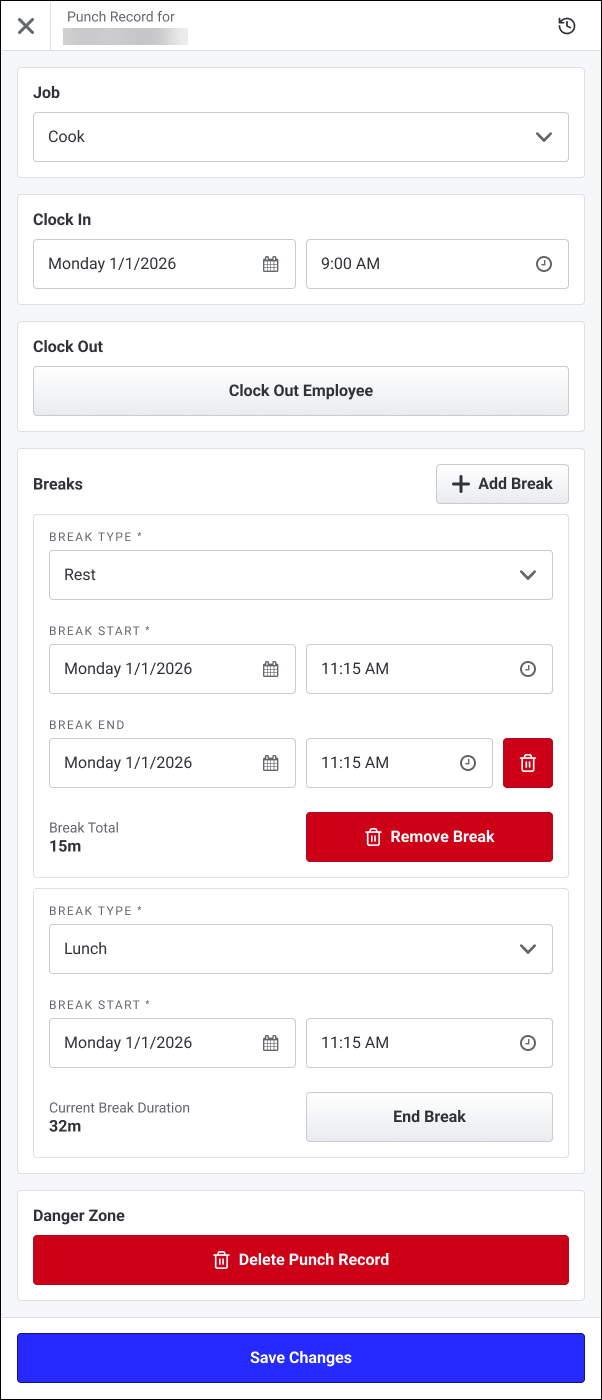
The Employee Time Punches function enables permissioned users to edit employee time punches for the current business date.
 |
Genius Portal
User role permissions:
Employee.TimePunches.Add - Add Employee Time Punches
Employee.TimePunches.Edit - Edit Employee Time Punches
Employee.TimePunches.Delete - Delete Employee Time Punches
Staff API
Endpoints added:
POST endpoint to create shift from POS
PUT endpoint to update a shift from POS
DELETE endpoint to delete a shift from POS
Require Manager Approval to remove items from an order other than the most recently added item. The removed items are identified as Voided.
Configure Item Void Triggering Events in Data Management at the Company/Site and Terminal Scheme level.
Company Preferences
From the Order Application → Ordering section, the Voiding → Item Void Triggering Events field now includes Items Other Than Last Added.
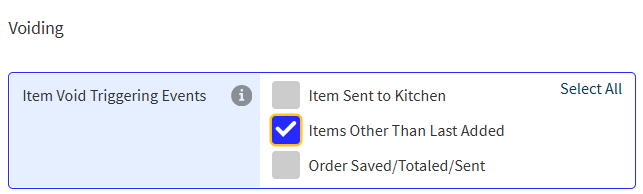 |
When selected, items removed from an order other than the most recently added item are classified as Voided items. Configured Void Item role permissions are applied.
Site Preferences
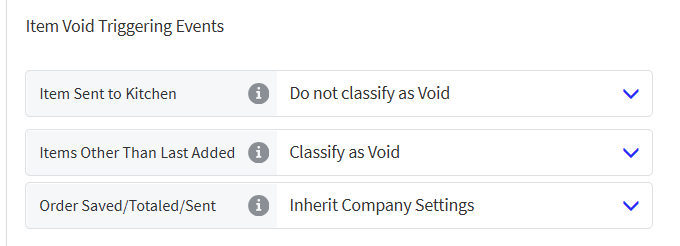
From the Order Application → Ordering section, identify the Item Void Triggering Events that cause items to be Voided rather than Canceled when the items are removed from an order.
From the dropdown for each event, select the preferred option:
 |
Terminal Scheme
From the Order Entry page, identify the Item Void Triggering Events that cause items to be Voided rather than Canceled when the items are removed from an order.
From the dropdown for each event, select the preferred option:
|
Print labels to track the lifecycle of raw food items used in product prep.
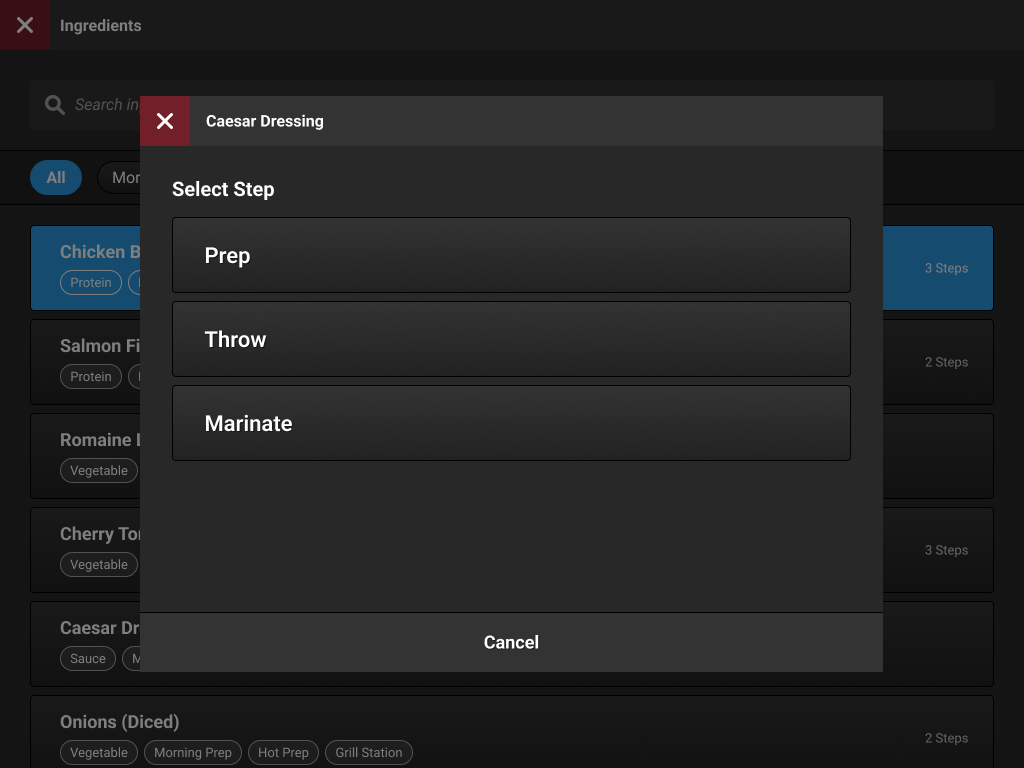
From the Preparations column of the Functions screen, select Ingredients.
From the Ingredients list, select the Ingredient and Preparation Step.
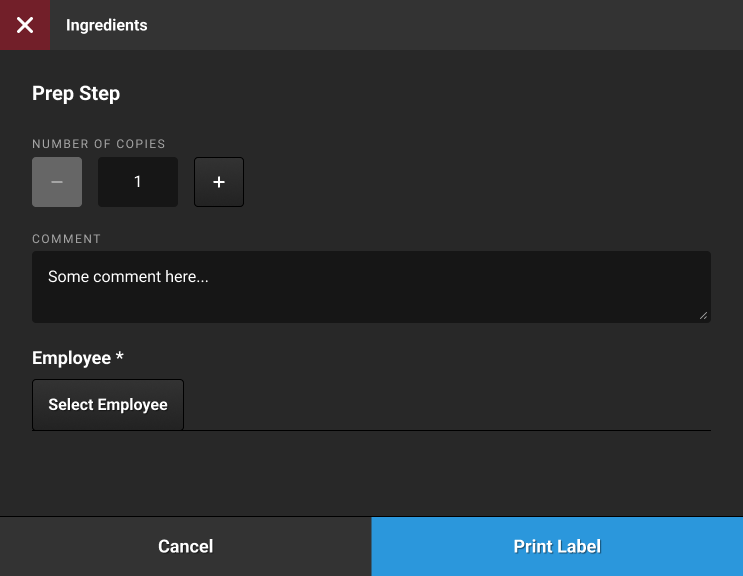
From the Prep Step form, select the employee performing the prep, add a comment, and print a label.
Define Preparation Steps
→ → →
Use Preparation Steps to create the preparation steps to assign to one or more ingredients. Define how to label actions within each step.
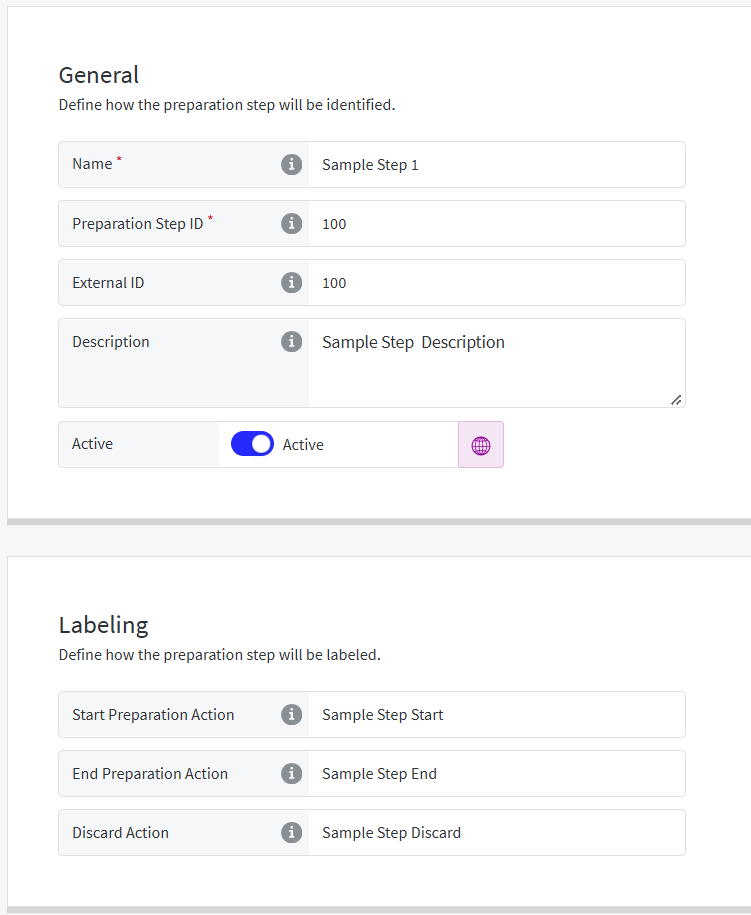 |
Define Ingredient Preparation Steps
→ → →
From the Preparation Steps section, add sets of Preparation Steps to ingredients.
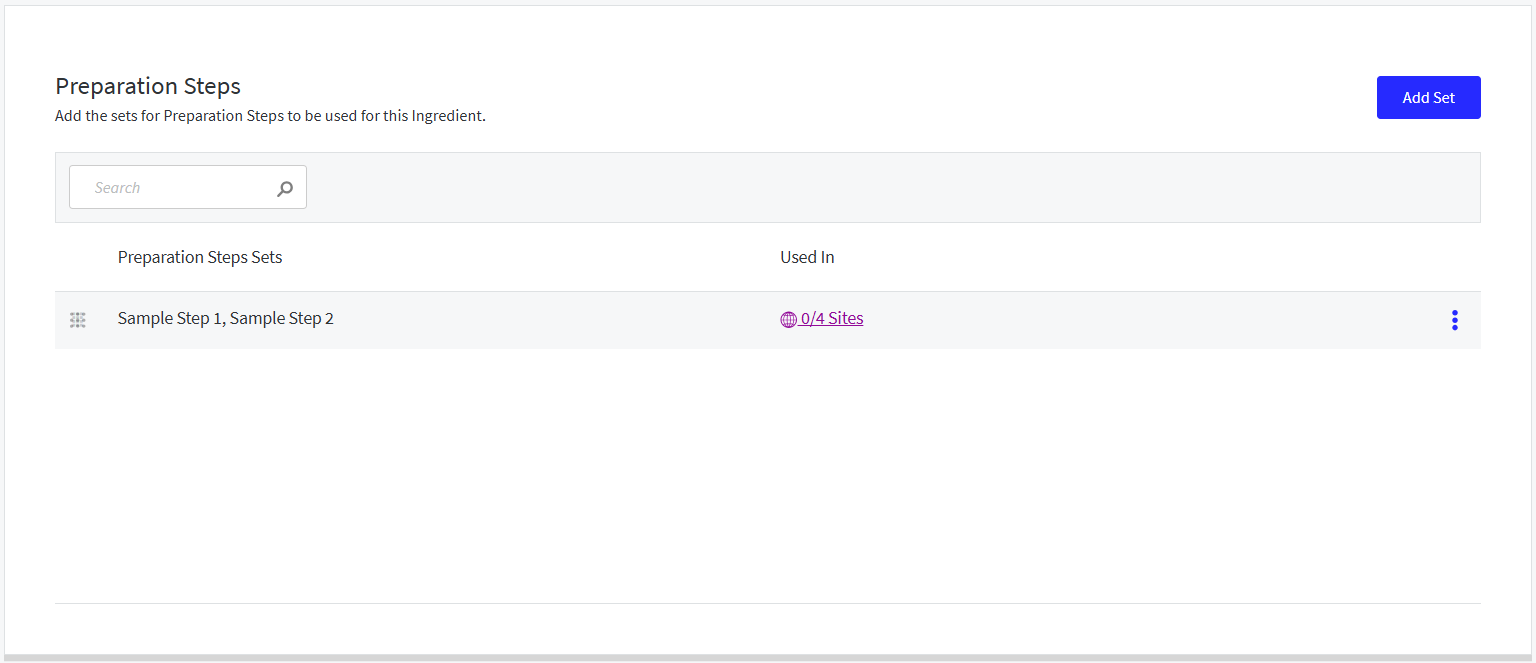 |
Enable Ingredients Function for Terminal Scheme
→ → →
From the Functions & External Applications page of Terminal Scheme, enable the following function:
Ingredients - When enabled, the Ingredients function is available for this terminal scheme.
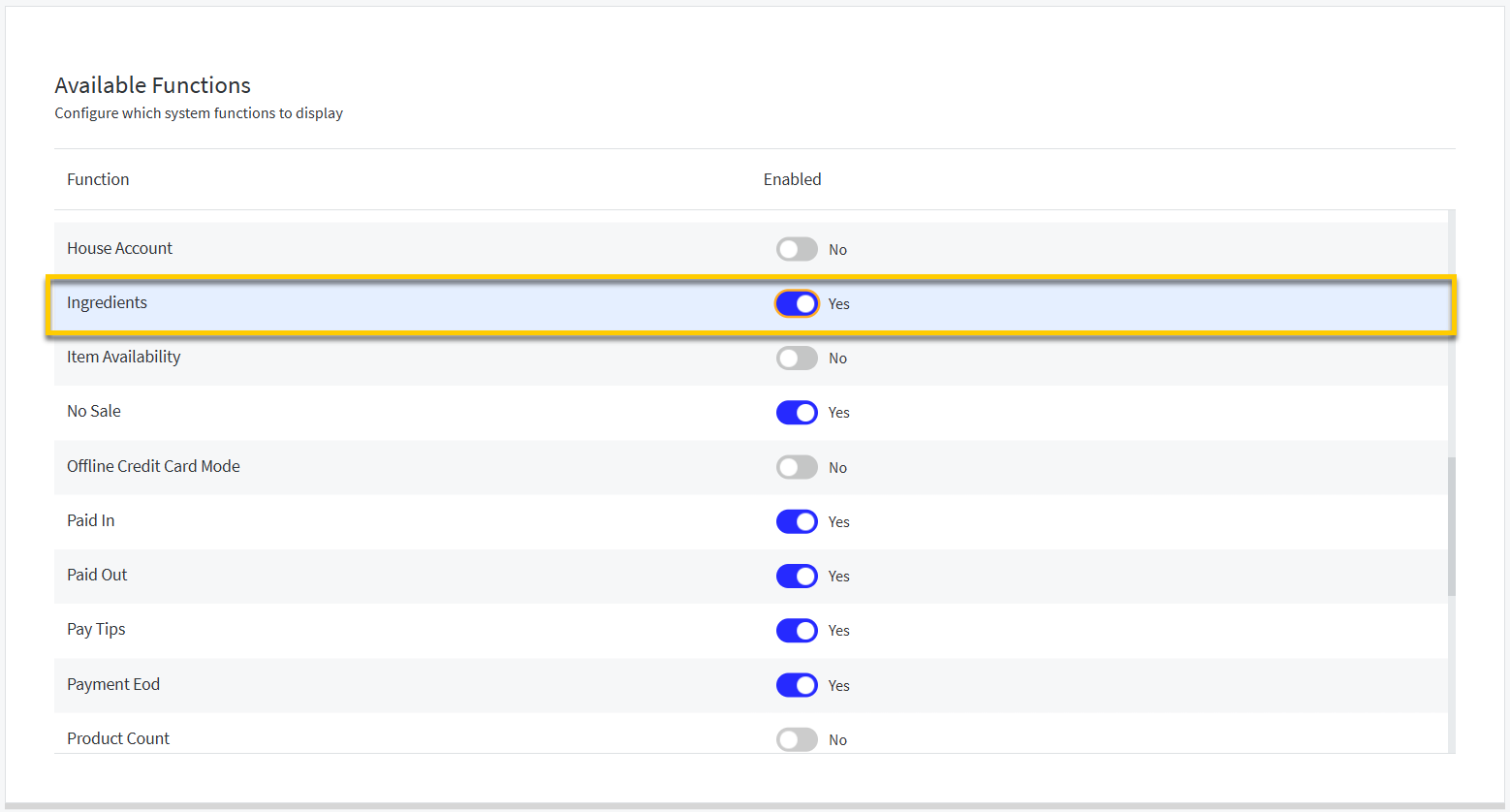 |
Create Template for Labels
→ → → →
From the Template Type dropdown, select Preparation Steps to create the template for the labels.
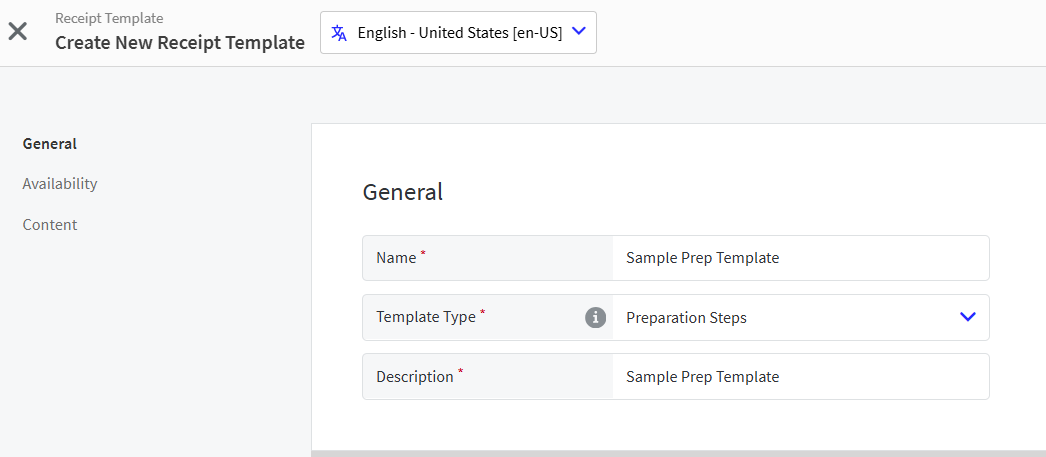 |
The Preparation Steps template includes the following pages:
General - Define the name, template type, and description
Availability - Define availability by site
Content - Use the Template Editor to edit the default content as needed
Define Company/Site Preferences
→ → → →
From the Ordering Application > Kitchen Settings > Ingredients section, define the following:
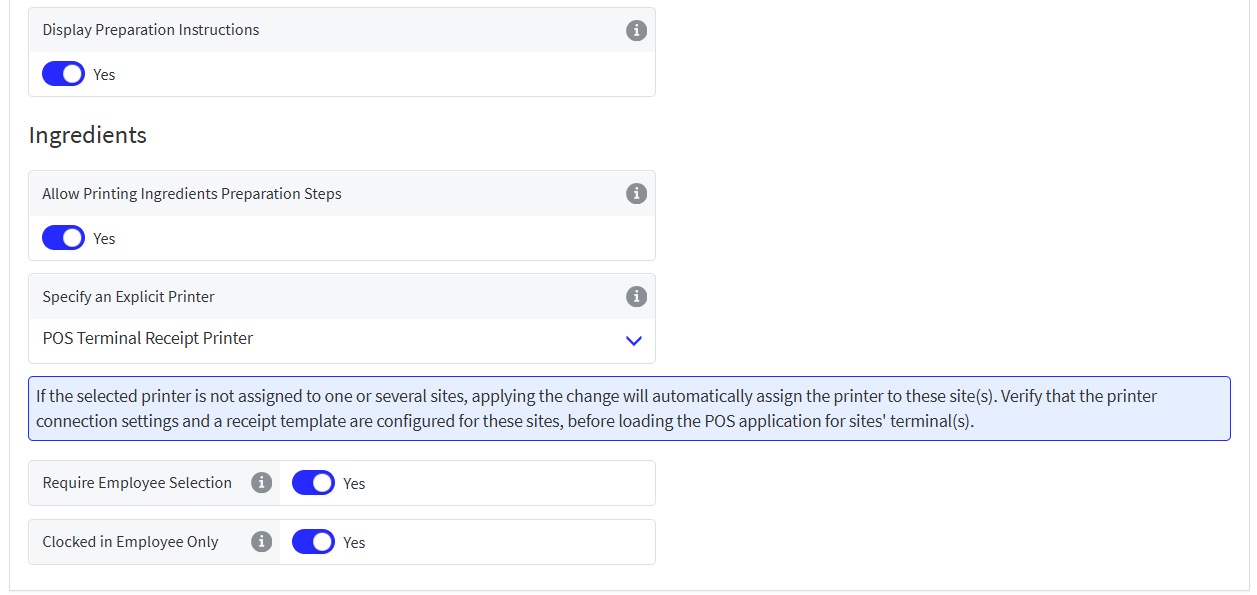 |
Allow Printing Ingredients Preparation Steps - Print ingredient preparation steps from the specified printer
Specify an Explicit Printer - Select the printer for Ingredients Preparation Steps
Require Employee Selection - Require POS user to select the employee who performed the preparation steps
Clocked in Employee Only - Only list Clocked In employees when selecting the employee who performed the preparation steps
Genius Portal
When copying data to Sites, the Ingredients entity is an optional dependency of Product List.
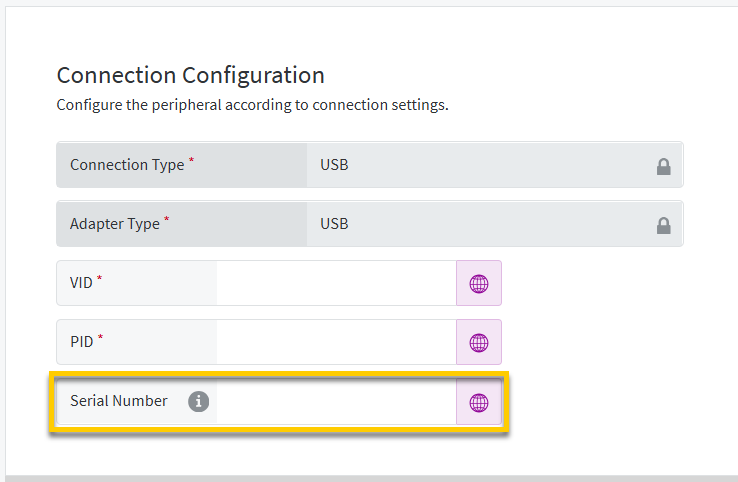
Updated POS to reference the Serial Number to distinguish between USB printers connected to the same terminal. This ensures each printer performs its respective functions on startup.
This is only necessary when the printer is connected to an Android POS terminal with another USB printer with matching VID/PID.
Peripherals Setting
Genius Portal → 4-Dot Menu → Data Management → Ordering Settings → Hardware → Peripherals
From General → Connection Configuration settings for USB Printers, specify the Serial Number:
 |