2026 May | Feature Highlights
Online Ordering | Custom Delivery Fees
PRMA-5644
New option to set custom delivery fees to comply with Canadian packaging fee requirements.
Affected Components:
Data Management (DM)
Genius Point of Sale (POS)
Genius Portal
Online Ordering (OO)
Data Management
Added support for new seeded Delivery Fee value in Fee List for new and existing companies.

Turned off visibility of seeded fees Shipping Fee, Delivery Service Bag Fee, and Delivery Fee from Point Of Sale display.
Genius Point of Sale (POS)
Calculated item-level tax values in the order object match the collected tax value passed by the integrator.
Genius Portal
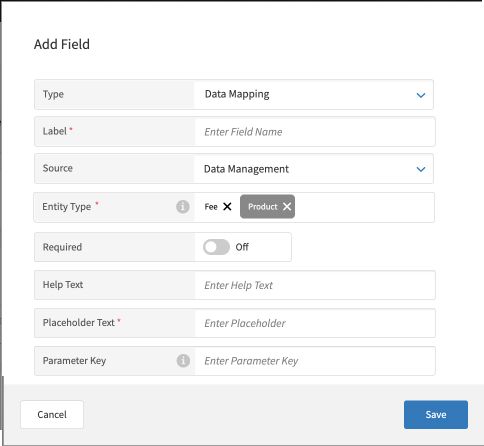
New Data Mapping field type in the Custom Service that allows users to specify a delivery fee for a DoorDash order.
 |
To add a Data Mapping field:
→ → →
From the Site Custom Fields Builder screen, select Add New Section.
In the Section Name field, type the name of the section.
From the lower-right of the Add Section popup, select Create.
In the new section, select + Add New Field.
In the Add Field popup, define the following:
From the Type dropdown, select Data Mapping.
In the Label field, type a name for the field.
From the Source dropdown, select Data Management.
In the Entity Type field, type the name(s) of the entity(ies) attributed to the field.
In the Required field, toggle Yes to make the field required.
Toggle No to not require the field.
In the Help Text field, type an instructional note to help the user understand the purpose of the field.
In the Placeholder Text field, type the placeholder text to display in the field when the section is first opened. The user replaces this text when they type their own value in the field.
In the Parameter Key field, type the key for the parameter.
From the lower-right of the Add Field popup, select Save.
Online Order
Integrated support for Delivery Fees so that packaging fees can be included in an order.
Online Ordering | Modernized UberEats Menu
PRMA-6998
Modernized UberEats menu publishing pipeline by removing an intermediate format conversion step. Menu Publisher now maps and publishes UberEats menus directly from the original Menu Engine format, reducing technical complexity and risk for future feature work.
Affected Components:
Online Ordering
Online Ordering
Updated Menu Publisher to use Menu Engine menu as the source when building UberEats menus.
Genius Point of Sale (POS) | In-store POS API Service
PRMA-3761
Genius Point of Sale (POS) can now utilize the local store network to connect to other applications within a site. This allows POS to continue operations when no internet connection is available.
Affected Components:
Data Management
IRIS
Genius Point of Sale (POS)
Genius Portal
Online Ordering
Data Management
Enabled separate origin for in-store API service with the following actions:
Added new origin to hardcoded origin list
added to default order source
If no default order source is empty
Added support for administrators to set default order destination through the following actions:
Added new dropdown setting Injected Order Default Destination to Create/Edit Order Source form
Injected Order Default Destination has options None, created Order Destinations, Varies
Tooltip reads Defines the default destination that orders will be served to when received from an external source
Warning message displays when selected Order Destination is not mapped to selected site
IRIS
Added IRIS API to an POS API service.
Genius Point of Sale (POS)
Implemented Post Order requests for In-Store POS API.
The Xenial POS API service enables systems such as kiosk and voice ordering systems to create and send orders to the POS to follow the Xenial order lifecycle.
Provided API service to enable third-party applications to integrate with the POS on the local store network with or without internet connectivity.
Implemented POST /order request to create orders in accordance with POS standards and send orders to the POS to follow the order lifecycle.
Implemented commit order request (PUT /order/{_id}/commit) to enable POS terminals to receive orders from third party applications.
Implemented GET Order request to enable POS terminals to receive orders with defined attributes based on filters.
Data Feed events are now sent for orders created or updated via In-Store API.
Updated GET /order requests to retrieve either pending or standard order version.
Implemented PUT payment request for orders.
Updated WEB-SRM Receipt Template to fulfill Duplicate Guest Check requirement.
Technical improvement to POS upgrade installation.
Technical improvement to order object and add/update item requests. Order updates are visible at the POS on next Commit.
Created Add Discount endpoint.
Created Delete Discount endpoint.
Updated API with Add and Delete Customer requests.
Genius Portal
Enabled management of in-store Point Of Sale API encryption by adding the new permission POSAPI.Renew.Encryption.Key at the global level for admin, Portal-Admin, and PS-Admin roles.
Enabled administrators to exercise control of encryption keys for In-Store API service to prohibit unauthorized use of service with the following actions:
Generate encryption keys for new and existing In-Store API service
Encryption keys stored in Security section of XPI subsection
Encryption keys rotate automatically on Site object retrieval
Renew Encryption Keys button is only accessible with Renew.Encryption.Key permission enabled
Enabled administrator configuration of purging period of In-Store API Service for site by adding new Purge Uncommitted Orders After [Minutes] setting in General tab.
Enabled access to Point Of Sale API functionality by adding new permission POSAPI.Order.View at global level.
Managed access to Point Of Sale API functionality with the following new permissions at the global level:
POSAPI.Order.Delete
POSAPI.Order.Committed.Delete
POSAPI.Order.Paid.Delete
POSAPI.Order.Other_origin.Delete
Enabled configuration of Port Number for in-store Point of Sale service with the following actions:
Added new Port Number setting with tooltip functionality beneath Active toggle in General tab
Port Number setting is only required for site when Active toggle is set to True for site
Port Number setting is empty by default with maximum value of 65535
Enhanced control of void payment functionality by adding the following new permissions at Global level: posapi.Payment.Delete and posapi.Payment.Committed.Delete.
Online Ordering
Enabled integrator to set default order destination during order creation by updating API to consumer new default_injected_order_destination_entity_id object from Order Source configuration. (XOO-9610)
Genius Point of Sale (POS) | Custom Product Variant Types
PRMA-4660
Enhanced functionality of Product Variant Types to allow user-defined types and configuration options. This allows the user to create and name new variant types, ensuring proper functionality of display attributes and correct display of variant selectors.
Affected Components:
Data Management
Genius Point of Sale (POS)
Data Management
Added support to configure footer display with the following actions:
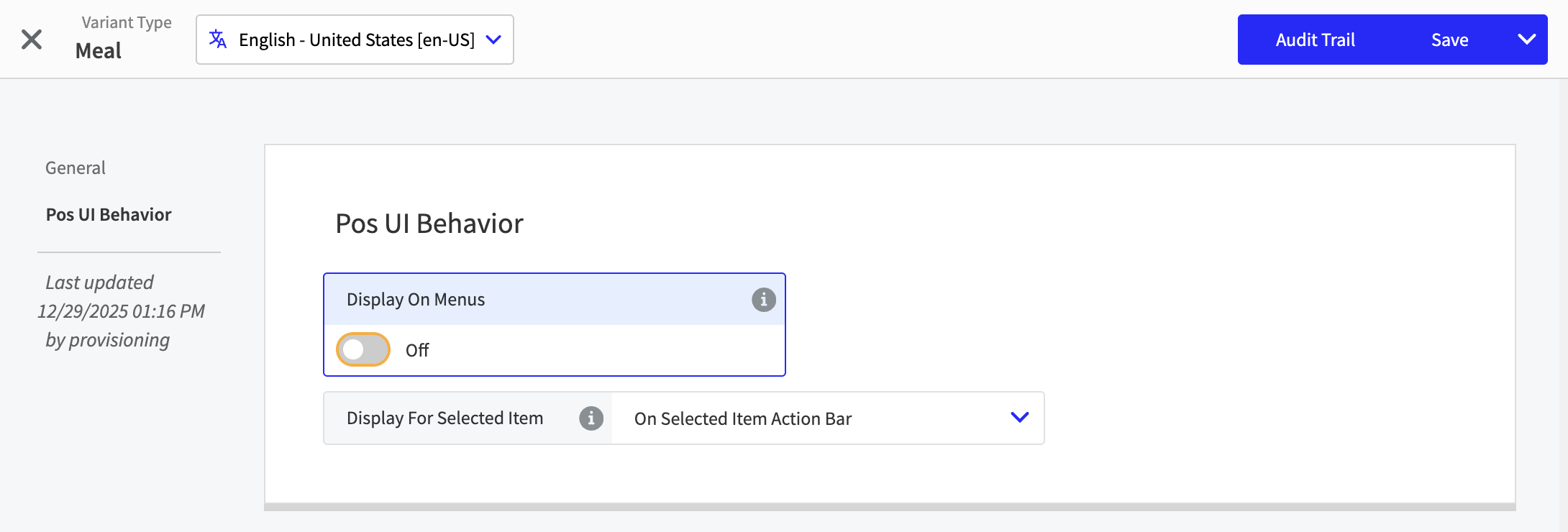
Added POS UI Behavior section to Variant Type editor, triggered by clicking New Variant Type button. Section features Display On Menus toggle field and Display For Selected Item dropdown
Added Display For Selected Item dropdown setting features options Do Not Display; Within Modifier Collection; On Selected Item Actions Bar
 |
Genius Point of Sale
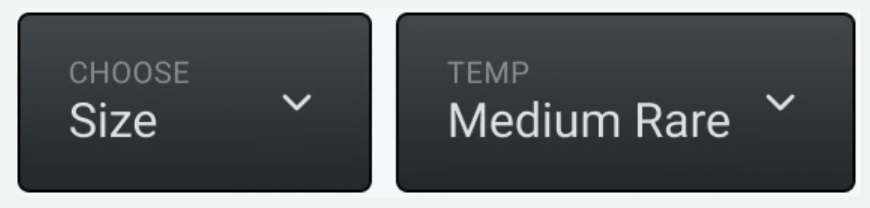
Genius POS terminals can now display Custom Product Variant Types.
 |
Genius Point of Sale (POS) | Hide Unavailable Menu Items
PRMA-5013
To improve POS menu usability and reduce clutter when products or modifiers are unavailable:
Determine if unavailable items are Hidden -OR- Disabled by default on POS menus
Optionally provide POS users with the ability to reverse the default visibility rule for unavailable items
Affected Components:
Data Management
Genius Point of Sale (POS)
Data Management
Define the following settings in the POS Display section of Menu Item Groups and Modifier Groups:
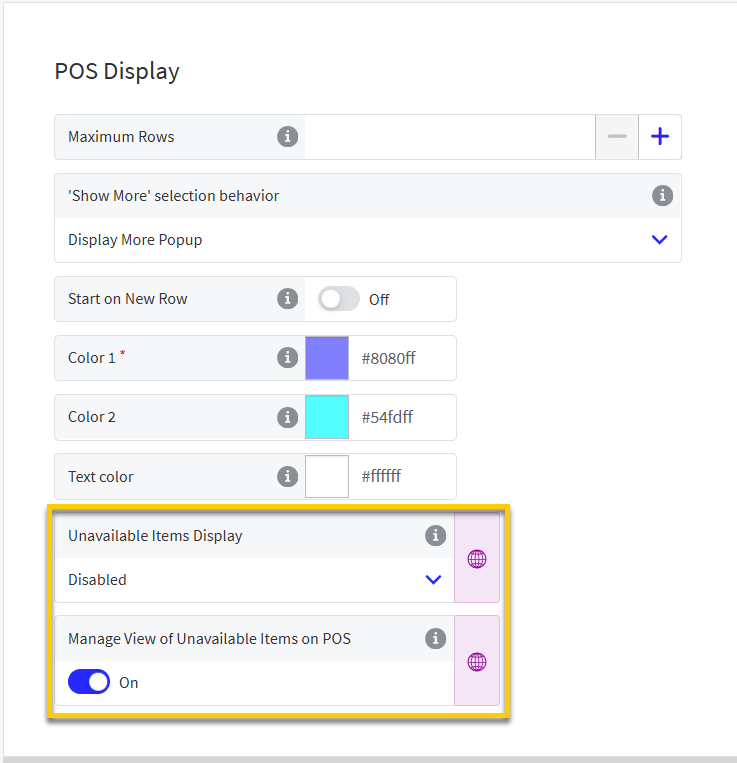 |
Unavailable Items Display - Determines if unavailable items in this group are Hidden or Disabled by default on POS menus.
Manage View of Unavailable Items on POS - When enabled, the POS user is provided with the option to temporarily reverse the default visibility rule for unavailable items.
Genius Point of Sale (POS)
The default visibility rule for unavailable items defined in Data Management is applied to POS menus.
In the following example, unavailable items are hidden by default. A count label indicates the number of unavailable items in each menu item group.
| ||
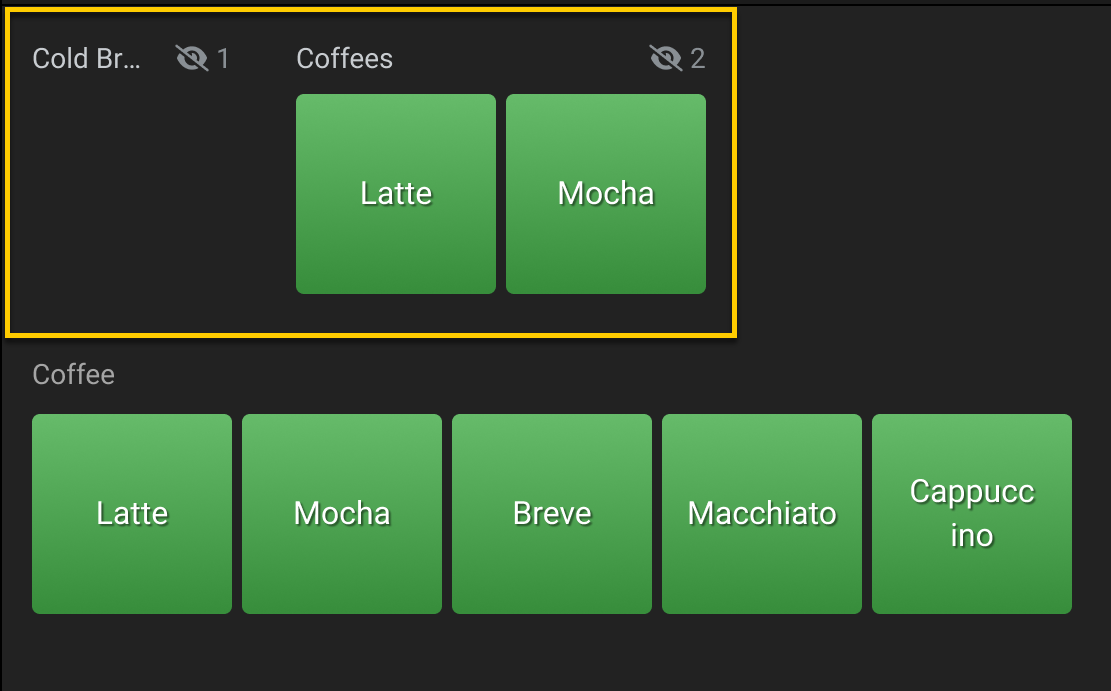
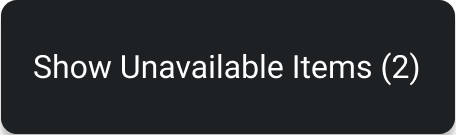
Long-press individual items or menu item group headers to temporarily reverse the visibility rule for unavailable items in that group.
Depending on the rule, one of the following options is available from a shortcut menu:
|
|

Genius Point of Sale (POS) | Sign In/Out Enhancements
PRMA-5347
Enhanced Sign In/Out, Clock In/Out , and Break In/Out processes for Genius Point of Sale (POS) to provide Time Clock on the landing page and automatically log users out upon successful Clock Out and Break Out.
Affected Components:
Data Management
Genius Point of Sale (POS)
Data Management
Added sign-out options for Clock In/Break Out in the Terminal Scheme Settings of Data Management.
The following setting is located on the General page of the Terminal Scheme editor in Data Management:
Show Clock In/Out on Sign In Screen - Include Clock In / Break In button on Sign In screen or Starting View
Genius Point of Sale (POS)
Improved Sign In / Clock In functions:
If a Starting View is not displayed on Sign In:
Time Clock opens (hourly employees)
System Navigation menu opens (salaried employees)
(Optional) Include Clock In / Break In button on Sign In screen or Starting View
Automatically Sign Out users upon successful Clock Out or Break Out
Genius Point of Sale (POS) & Kitchen Management | Coursing
PRMA-6340
Use the Coursing feature to assign order items at the POS to meal courses. Course examples include: Appetizer, Entrée, Dessert.
Coursing ensures order items are prepared and served in the preferred sequence. Items are grouped by their assigned course on the POS, Kitchen displays, printed chits, and labels.
You can enable coursing for all or select kitchen displays. You can also manage coursing requirements by product and order destination.
Affected Components:
Genius Point of Sale (POS)
Kitchen Management
Data Management
Cloud Portal
Genius Point of Sale (POS)
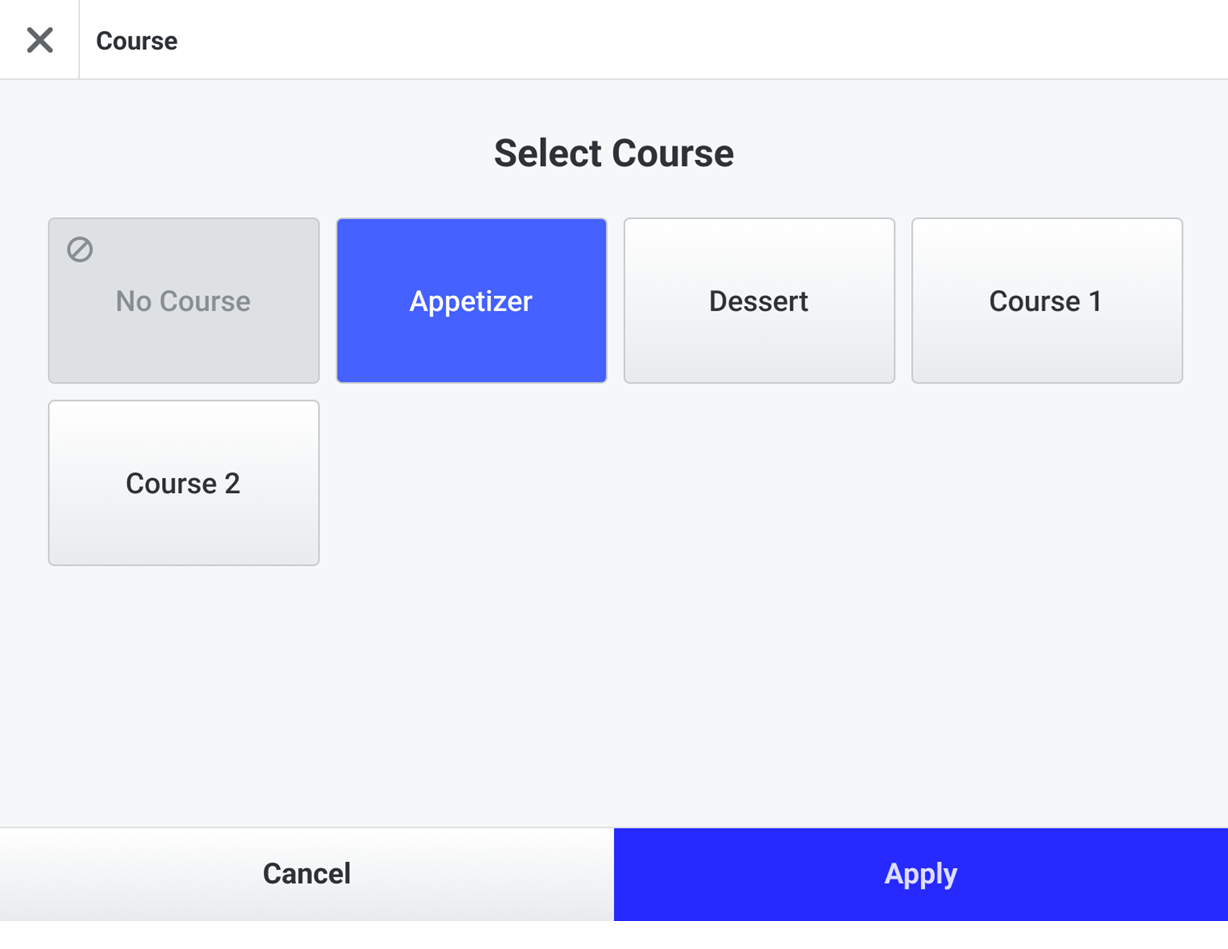
From the POS, you can assign, change, and delete course assignments for order items, including bundle components.
From the Actions menu, select Course to manage course assignments for one or more selected order items.
 |
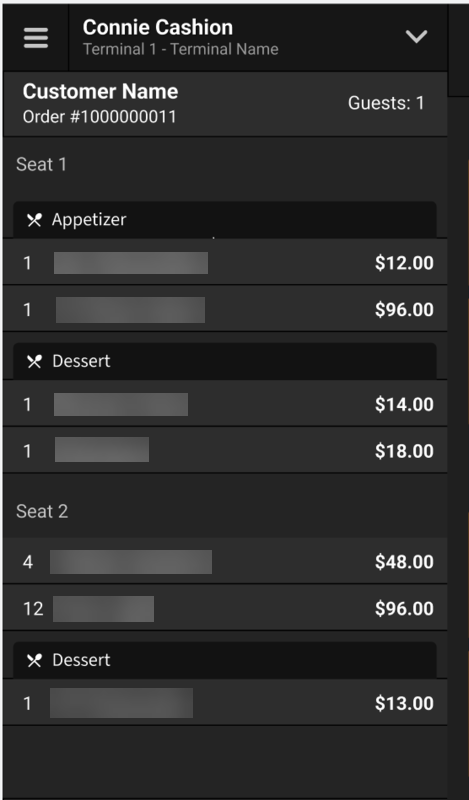
Course assignments are identified on the item listbox. Items without a course assignment are listed at the top of the order segment.
 |
Note
Course grouping occurs prior to grouping by order segment.
Split, Combine, and Share functions are supported.
Kitchen Management
The course name is identified in the course session header of the kitchen cell.
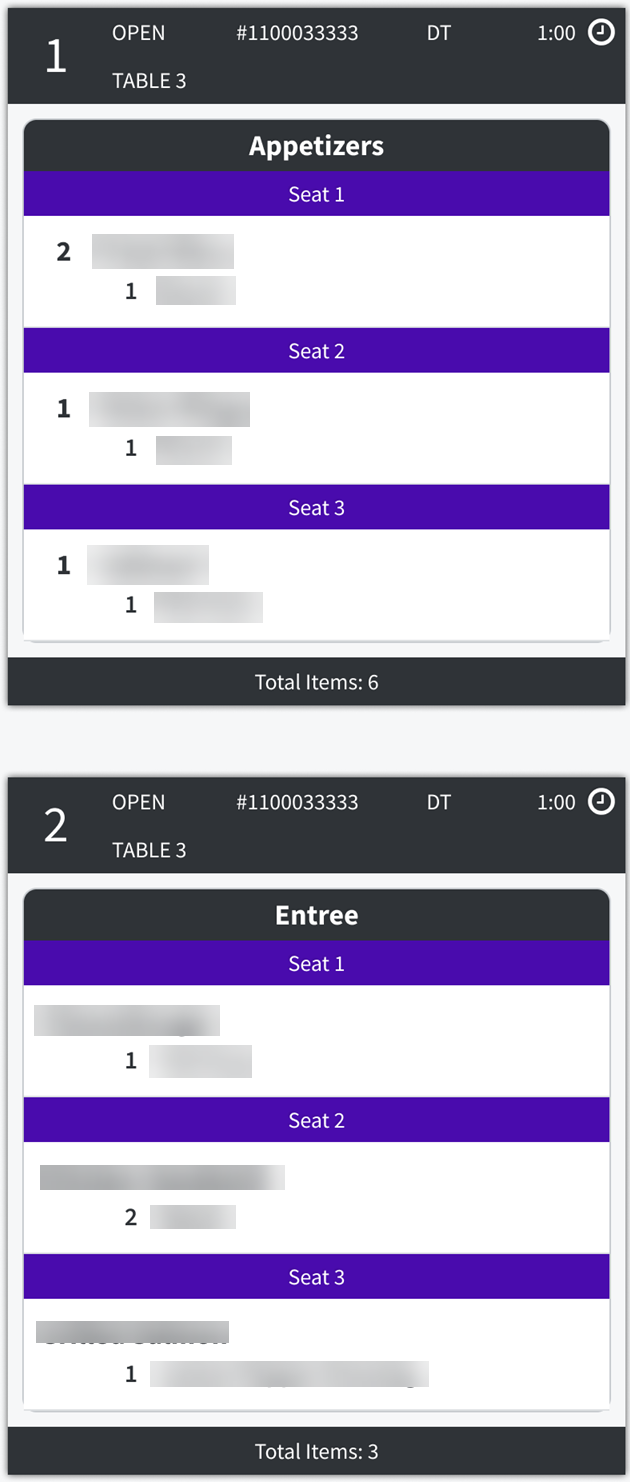 |
Related Kitchen Screen Settings
When Item Bump is an enabled Item Lifecycle Event, double-tap a course name to bump the entire course.
When Display Changes In Order is enabled in Cell Settings, indicators for order updates are displayed within the course session.
Data Management
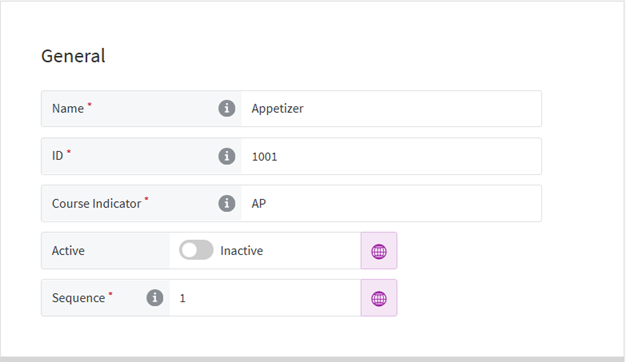
The following editors are used to configure Coursing:
Courses - Use Courses to create the courses to which POS users assign products. |
| |
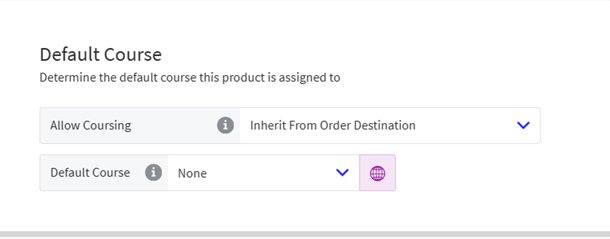
Products - From the Kitchen → Default Course section of Product List, manage coursing by product. |
| |
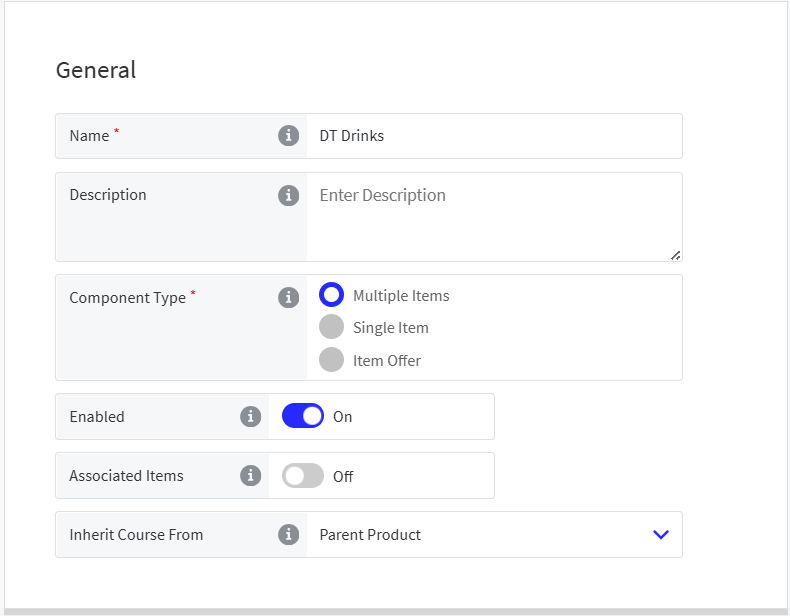
Bundle Components - From the General section of Bundle Components, locate the Inherit Course From setting. Select the product from which bundle components inherit their course assignment. |
| |
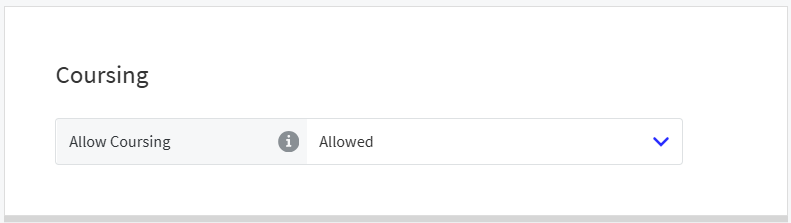
Order Destinations - From the General → Coursing section of Order Destinations, manage coursing by order destination. |
| |
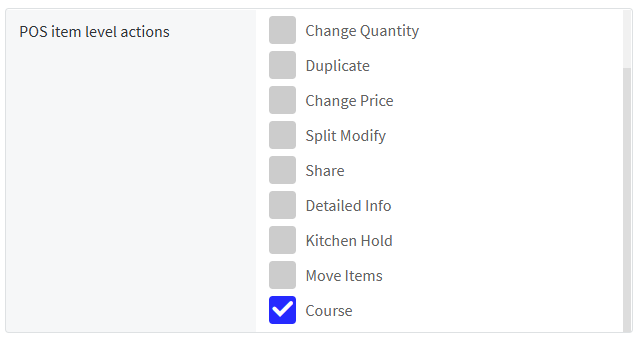
Terminal Scheme - From the General section of Terminal Scheme, enable Course as a POS item-level action. When enabled, the Course action is available for the terminal scheme enabling the user to manage course assignments. |
| |
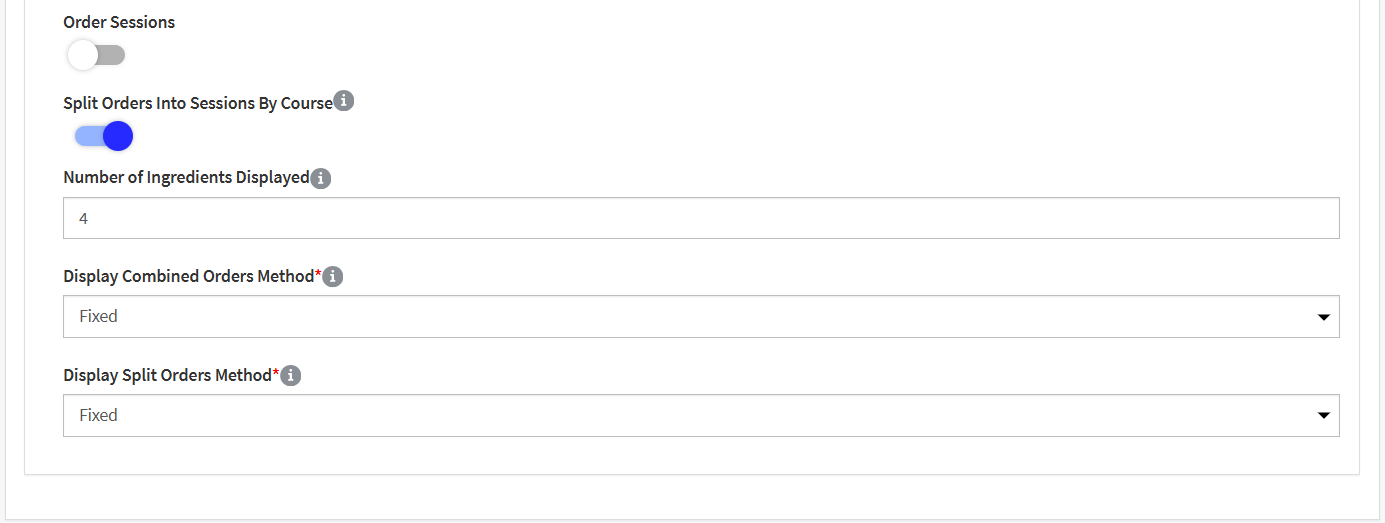
Kitchen Settings - To enable coursing for all screens, enable Split Orders into Sessions by Course from General Kitchen Settings. |
| |
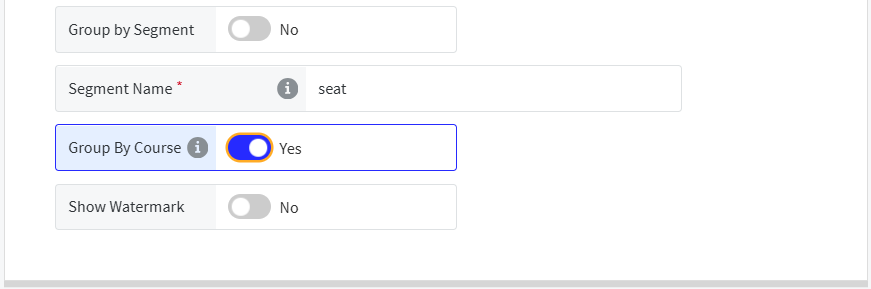
To enable coursing for individual screens, use Group by Course from the Cells → Cell Body section of Kitchen Screen Settings. |
| |
Print Template Variables - The course_name variable is supported on the Bump Chit and Item Label receipt templates. | ||
Cloud Portal
Permission | Key | Description |
|---|---|---|
Add Course | course.Add | Allow adding new course |
Delete Course | course.Delete | Allow removing course |
Manage Course | course.Manage | Allow editing course |
View Course | course.View | Allow viewing course |
Genius Point of Sale (POS) | Default Modifiers
PRMA-6802
Added configurable control for default modifiers a modifier is substituted in a single-select modifier group. Users can now choose whether the system automatically adds a No <Default Modifier> entry to orders, improving kitchen accuracy, inventory tracking, and allergen safety.
Affected Components:
Data Management
Genius Point of Sale (POS)
Data Management
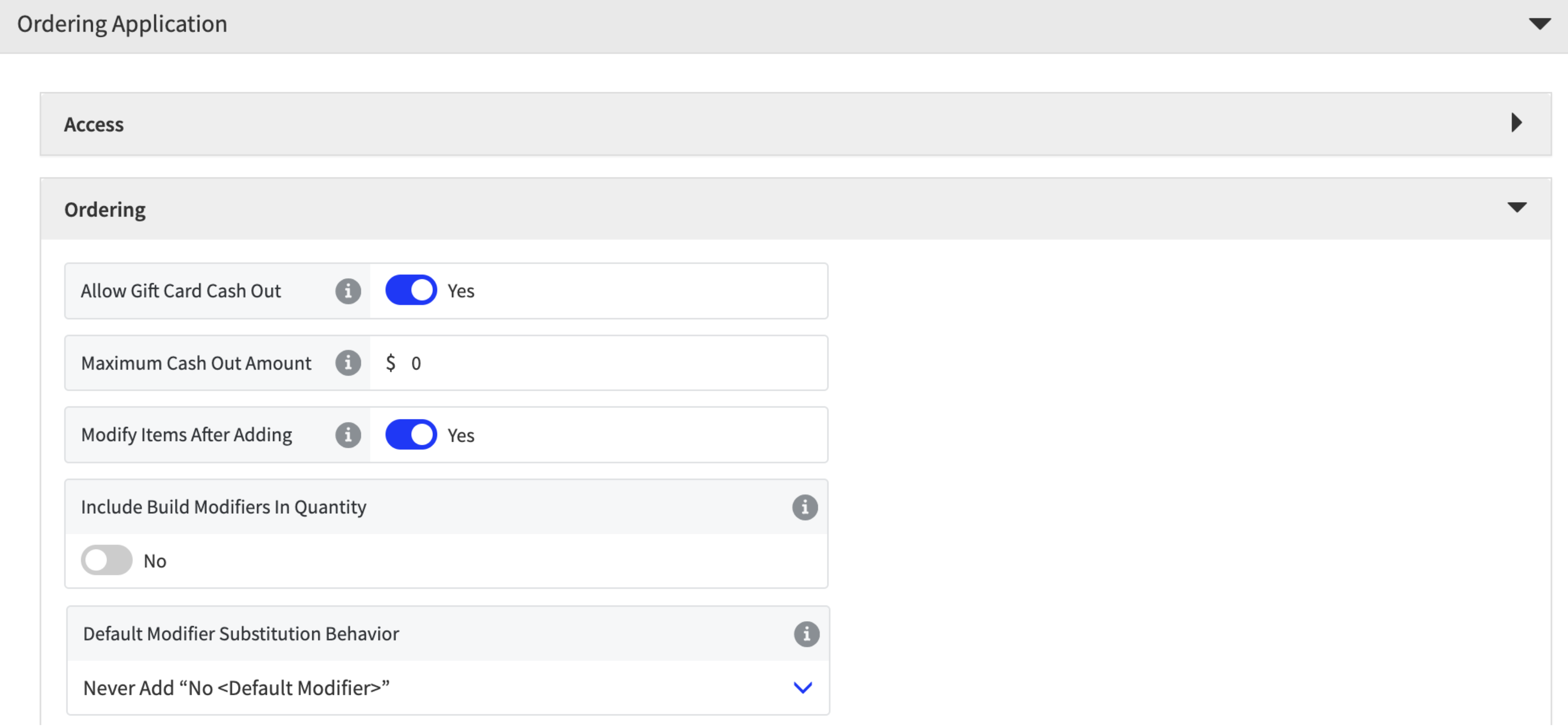
Enhanced accuracy of order fulfillment by adding new Default Modifier Substitution Behavior dropdown to Ordering section with following options: Never Add "No <Default Modifier> (default); Always Add "No <Default Modifier>
From the Ordering Application → Ordering section of Company/Site Preferences:
Default Modifier Substitution Behavior - Selected option determines if No [Default Modifier Name] is displayed on screens and receipts when the POS user replaces the default modifier for an item.
This setting only applies to Modifier Groups with a maximum quantity of one (1).
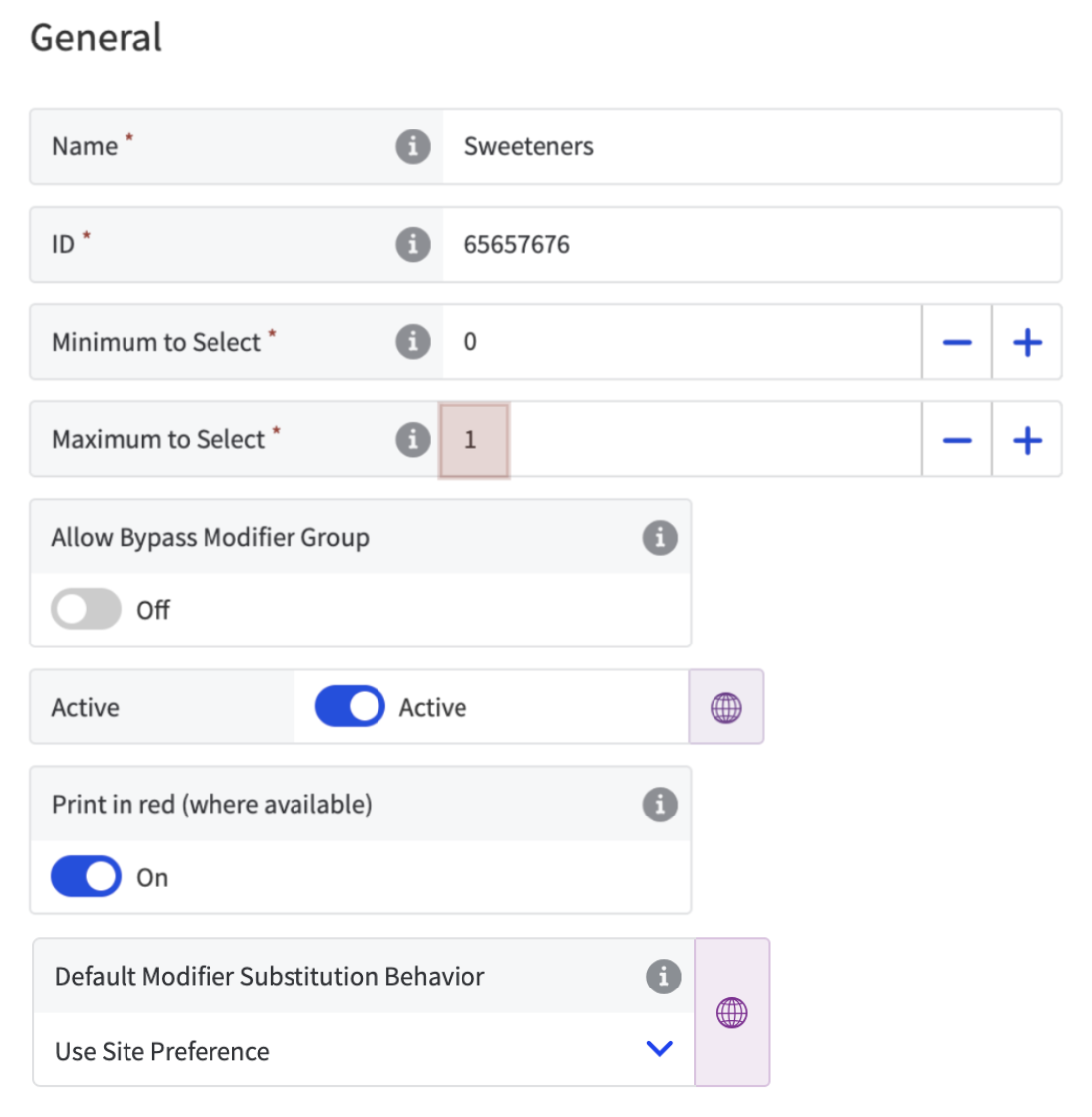
Modifier Group Setting
From the General section of Modifier Groups, define the Default Modifier Substitution Behavior for specific modifier groups.
 |
Genius Point of Sale (POS)
Added support for default modifier substitution for order items.
Genius Point of Sale (POS) | Convert Loyalty Points to Rewards
PRMA-6941
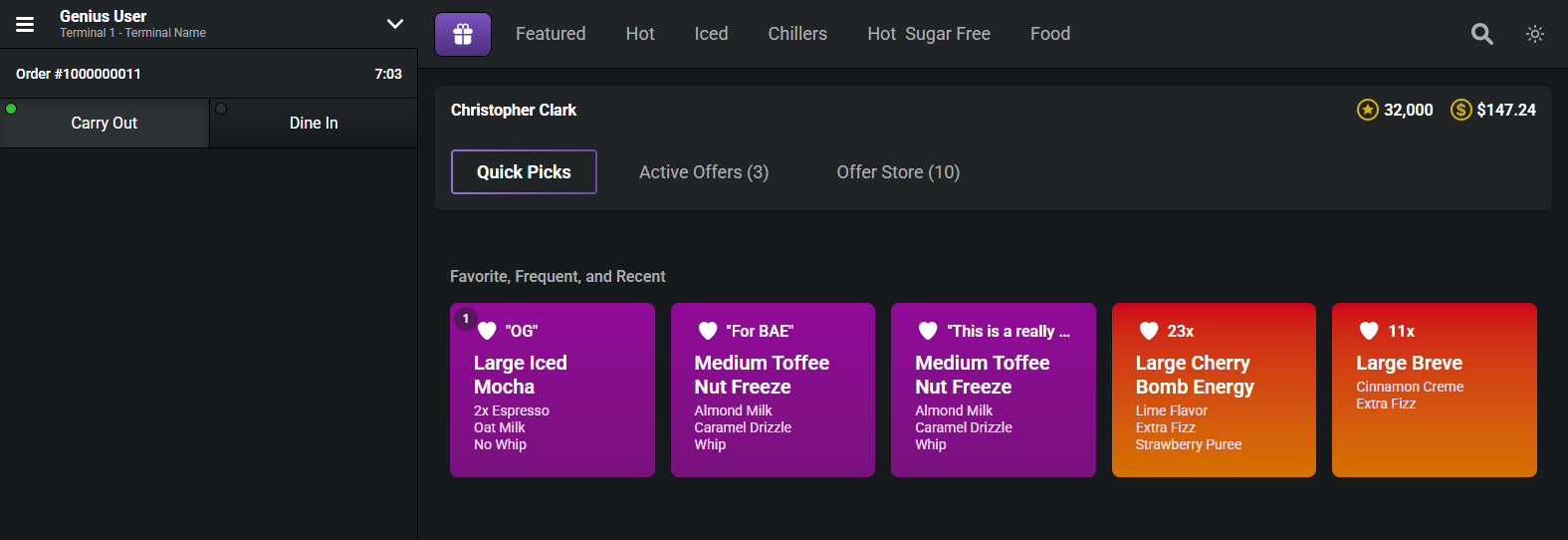
Genius Point of Sale (POS) now allows Loyalty Customers to manually redeem rewards using their Loyalty Points. Originally, 1,000 points were automatically converted. Now Loyalty Customers can choose to redeem rewards using their current point balance or save it for later.
Affected Components:
Genius Point of Sale (POS)
Genius Portal
Gift and Loyalty
Genius Point of Sale (POS)
Added the ability to exchange loyalty customer’s points to offers.
 |
Genius Portal
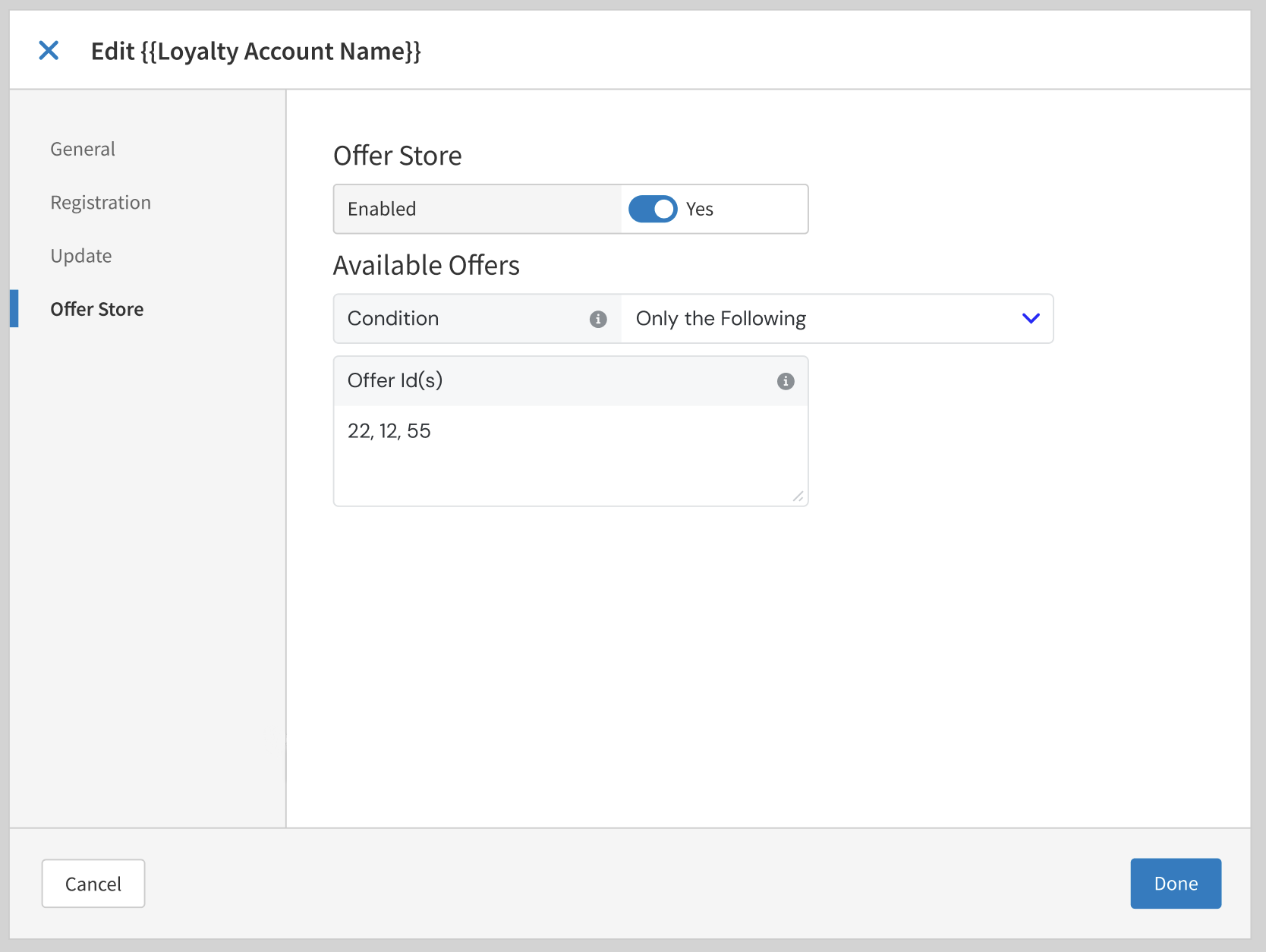
Added support for converting Loyalty points to rewards with the following actions:
Add new section Offer Store to Paytronix loyalty service modal screen at Company and Site levels
Add new Enabled toggle to Offer Store section, with Off as default setting
When Enabled toggle is On, Condition dropdown displays with options Only the following; Exclude the following; tooltip. Optional text entry field Offer Id(s) displays with tooltip
 |
Gift and Loyalty
Enhancement of Paytronix Loyalty Engine in Gift and Loyalty to include available rewards for points exchange
Genius Portal | View Salesforce Billing
PRMA-6425
Added the ability to open Salesforce Customer Billing Experience (CBEX) from Cloud Portal. This allows user to visit CBEX while keeping the Cloud Portal session open.
Affected Components:
Genius Portal
Genius Portal
Enabled access control for View Billing with new Salesforce.Billing.View permission at global and company levels.
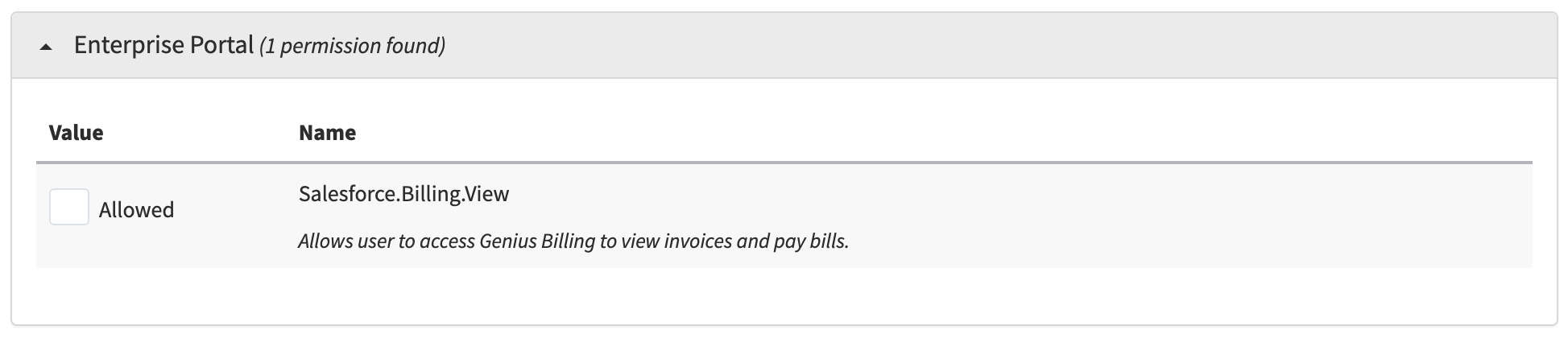
Enabled a dedicated new browser tab to be opened to view Salesforce Customer Billing Experience (CBEX).
Reporting | Alternate Name Field For Order Objects
PRMA-6420
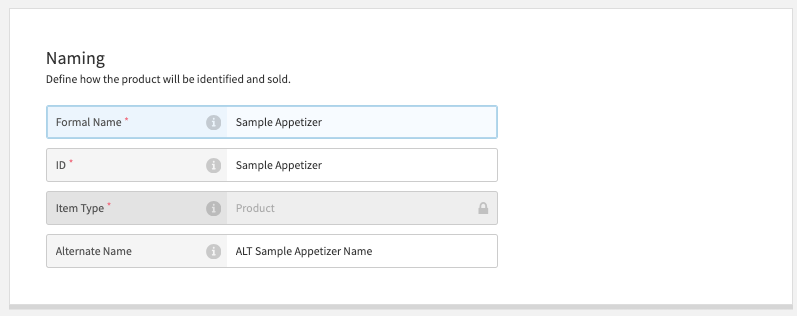
Added Alternate Name field for items to Genius Point of Sale (POS) and Online Ordering so the information could be included in reports to increase accuracy in Reporting.
Affected Components:
Data Management
Genius Point of Sale (POS)
Online Ordering
Reporting
Data Management
Added Alternate Name field to Naming section of Product editor.
 |
Genius Point of Sale (POS)
Added setItemAlternateName and setChildItemAlternateName functions to OrderEngine POS API.
Online Ordering
Added alternate_name function to OrderEngine Online Ordering API.
Reporting
Alternate Name is now included in Reports.
Reporting | UberEats Reports
PRMA-6507
Added the ability to export UberEats Reports using data from UberEats platform to analyse and reconcile information.
Affected Components:
Genius Portal
Online Ordering
Reporting
Genius Portal
Enhanced delivery service Reporting functionality by adding new permission Uber Eats Report (Reporting.Uber.Eats) at Company and Global levels.
Online Ordering
Enabled user to generate and download Uber Eats reports as ZIP archive by adding support for receiving Webhook notification and SQS notification.
Reporting
Added UberEats Report.
Technical Update| Updated Node.JS Version
PRMA-6039
Update the Node.JS version for both ECS workloads and Lambdas, as the current version will reach its end of support.
Affected Components:
Back Office
Data Management
Digital Menu Board
Genius Portal
Pipeline
Suite Catering
Venue Inventory
Back Office
Upgraded Node.JS version to 22.15.0
Data Management
Upgraded Node.JS version to 22.14.0.
Digital Menu Board
Upgraded Node.JS version to 22.
Genius Portal
Upgraded Node.JS version to 22.14.0.
Pipeline
Upgraded Node.JS version to 22.11.0.
Suite Catering
Upgraded Node.JS version to 22.14.0.
Venue Inventory
Upgraded Node.JS version to 22.14.0.