2026 March | Feature Highlights
Data Management | Permissions
PRMA-3266
This update ensures that the People.AllSitesAccess permission for new users is effectively implemented in Data Management.
Affected Components:
Data Management
Kitchen Management | Load Balancing
PRMA-6163
Implement Load Balancing for kitchen orders based on item quantity/weight to improve order distribution between kitchen stations.
Affected Components:
Cloud Portal
Data Management
Kitchen Management
Point of Sale (POS)
Cloud Portal
Added load-balancing-rule to audit trail functionality.
Data Management
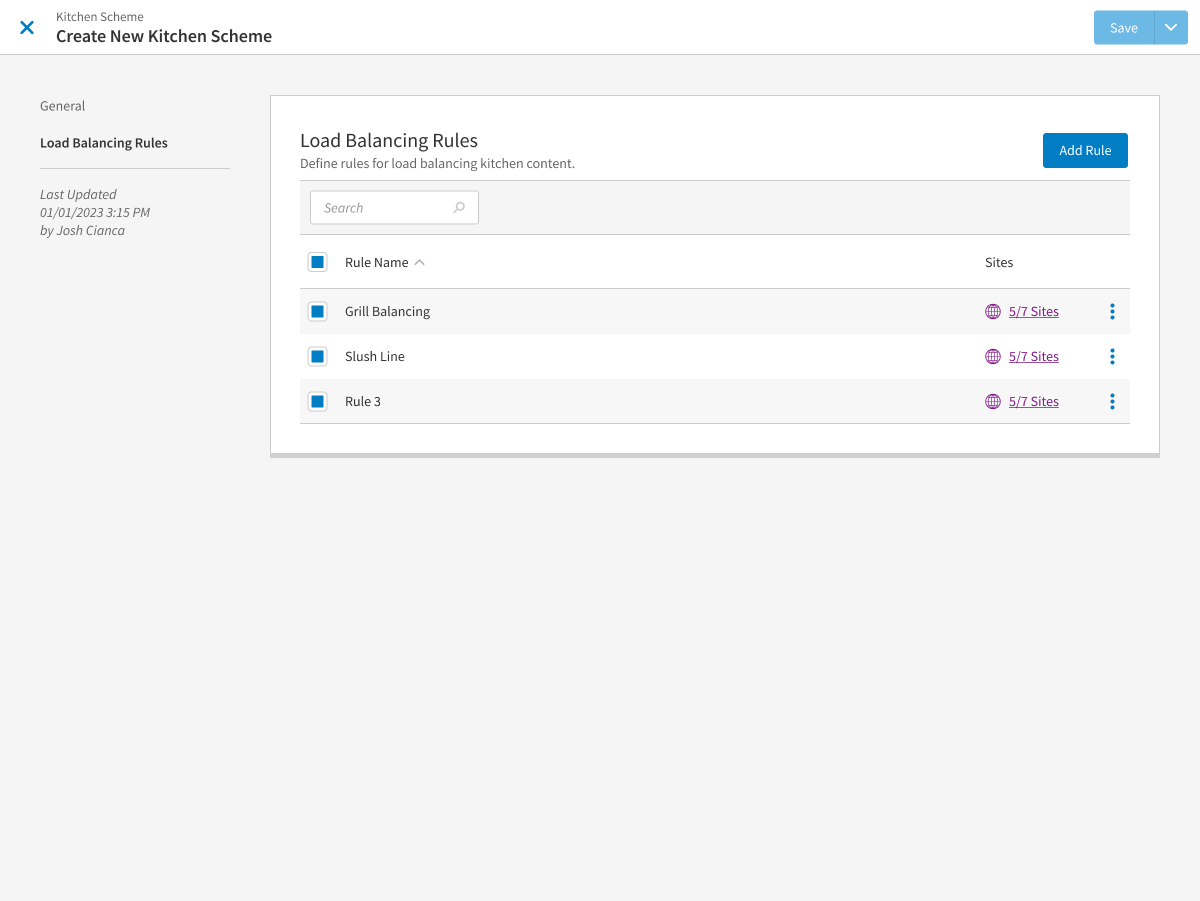
Enabled creation of Load Balancing Rules within Kitchen Schemes with the following actions:
Add new Load Balancing Rules tab to new and existing Kitchen Schemes
Load Balancing Rules tab contains Add Rule button and table with columns Rule Name and Active for the Site(s)
When Rules are added via new tab, available options are Edit and Remove
Load Balancing Rule modal offers tabs General and Distribution Groups
General tab option features the following settings: Rule Name; Active; Balance Method; Count Items
Distribution tab features the following settings: Description; Add Group button; search function; table with columns Group Name and Screens
When Distribution Groups are added to the grid, available options are Edit and Remove
Add Distribution Group modal offers Name input field
Screens grid offers Description; Add Screens button, search function; table with columns Screen Name and Exclude from Balance
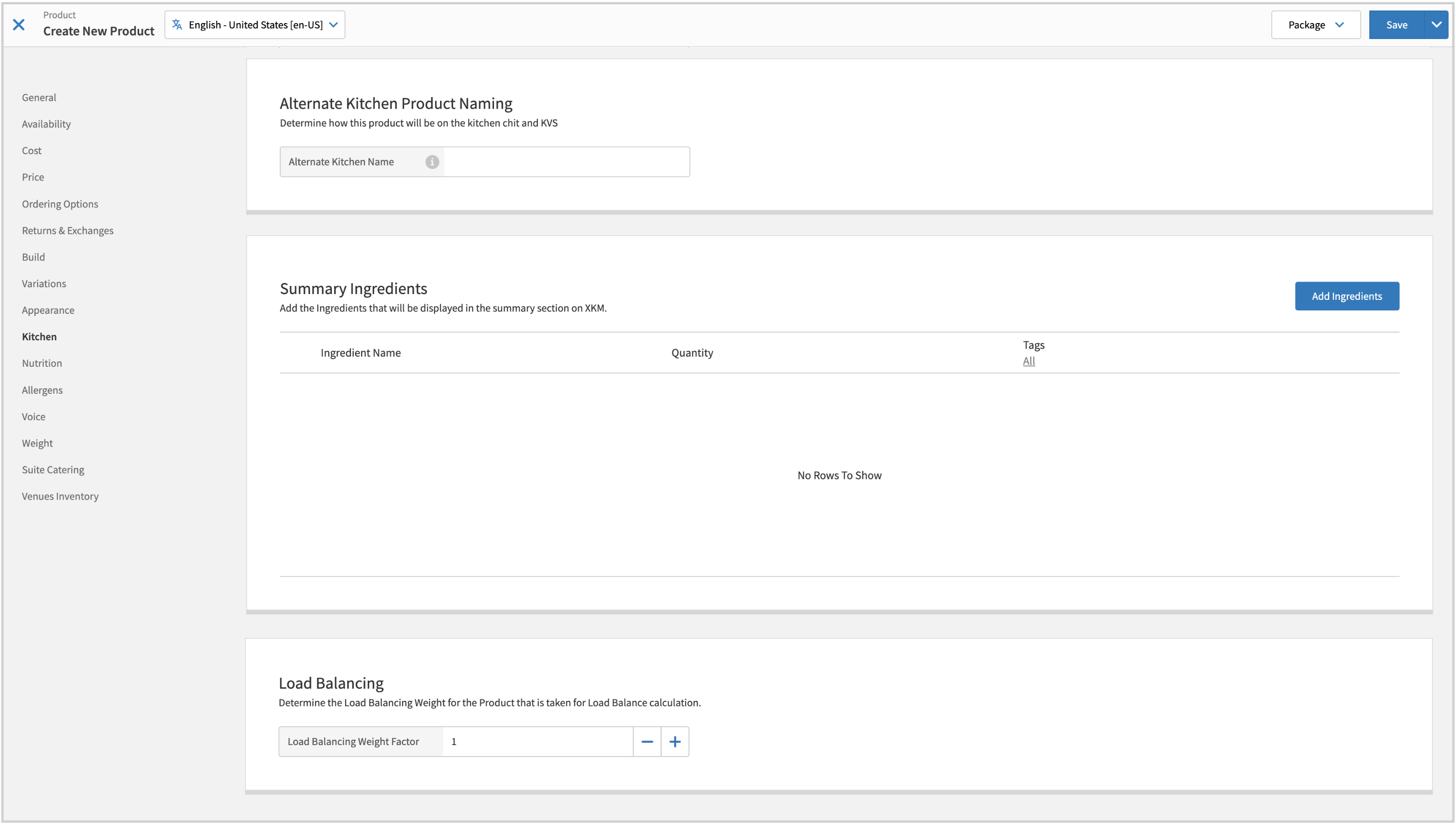
Added Load Balancing section to Product create/edit form in Kitchen tab, with Load Balancing Weight Factor input setting.
Kitchen Management
Load Balancing evenly distributes products on kitchen stations based on the respective quantity or weight of the products.
Deleted/Voided Products - Excluded from load balancing calculation.
Kitchen Scheme Change - Kitchen does not balance orders on scheme change.
Screens with previously balanced orders not included in the new scheme remain active until all active orders are bumped.
If Load Balancing is not enabled for new scheme, previously balanced orders are distributed on active screens in the new scheme in accordance with its filters and sorting rules.
Manage Load Balancing rules for a specific kitchen scheme from the Load Balancing Rules page of the Kitchen Schemes editor in Data Management.
Point of Sale (POS)
Define the Load Balancing weight factor for the product. Load Balancing is a Kitchen Management feature that evenly distributes products on kitchen stations based on the respective quantity or weight of the products.
Product Configuration
→ → → → → →
From the Load Balancing section of the Kitchen page, define the following:
Load Balancing Weight Factor - Weight factor for the product when calculating kitchen station load balancing.
Valid values: 1 - 100.
Kitchen Management | Android App - Vertical Orientation
PRMA-7077
Added support for vertical orientation for the Order Ready screen on Android devices.
Affected Components:
Data Management
Kitchen Management
Data Management
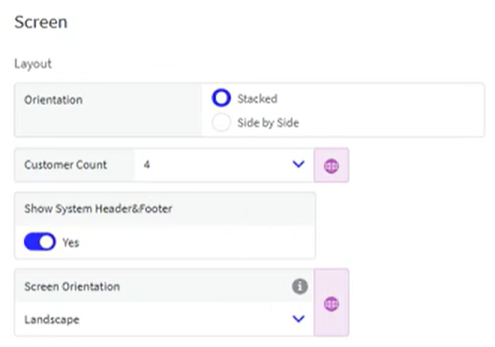
Added Screen Orientation setting to Theme → Screen section of Order Ready Display settings.
Kitchen Management
Vertical Screen Orientation for Order Ready Display is supported for Android and Windows.
Mobile Manager | Larger Text and Label
PRMA-7103
Added option to increase the size of text and labels in Mobile Manager
Affected Components:
Mobile Manager
Online Ordering | Cache Resetting
PRMA-6243
Enhanced Online Ordering cache resetting mechanism for companies with Menu Engine and Delivery subscriptions to ensure real-time updates upon portal or Data Management changes.
Affected Components:
Cloud Portal
Online Ordering
Cloud Portal
Updated Reset Cache functionality by adding the following permissions:
SiteStatusMonitor.Reset.Cache (under Menu Delivery)
MenuCreator.Reset.Cache (under Menu Delivery)
MenuPublisher.Reset.Cache (under Menu Delivery)
DeliveryAdapter.Reset.Cache (under Menu Delivery)
Notifier.Reset.Cache (under Enterprise Online Ordering)
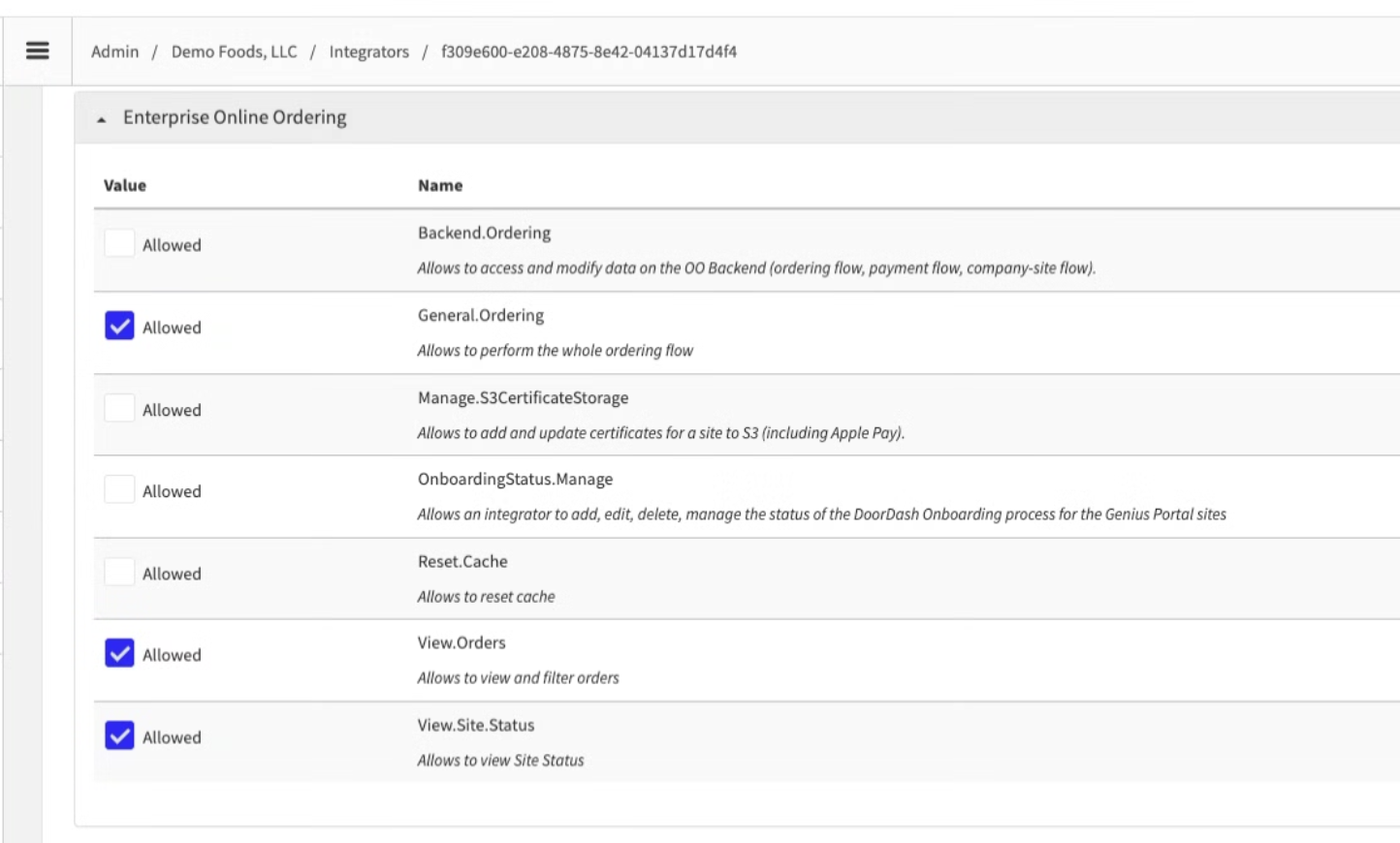
Enhanced access for Menu Publisher with new permission Menu Publisher access (MenuPublisher.Access) in Menu Delivery group at Global level and Ordering group at Company level.
Online Ordering
Cache update performs successfully and redis_remove_site_info_success events are present in logs as expected.
Online Ordering | UberEats Delivery Integration
PRMA-4917, PRMA-6458, PRMA-6480, and PRMA-6584
Integrated UberEats Delivery Online Ordering Interface.
Affected Components:
Cloud Portal
Data Management
Online Ordering
Pipeline
Point of Sale
Reporting
Cloud Portal
Added Preferred icon in Settings and Tools Custom Service next to preferred delivery partner name.
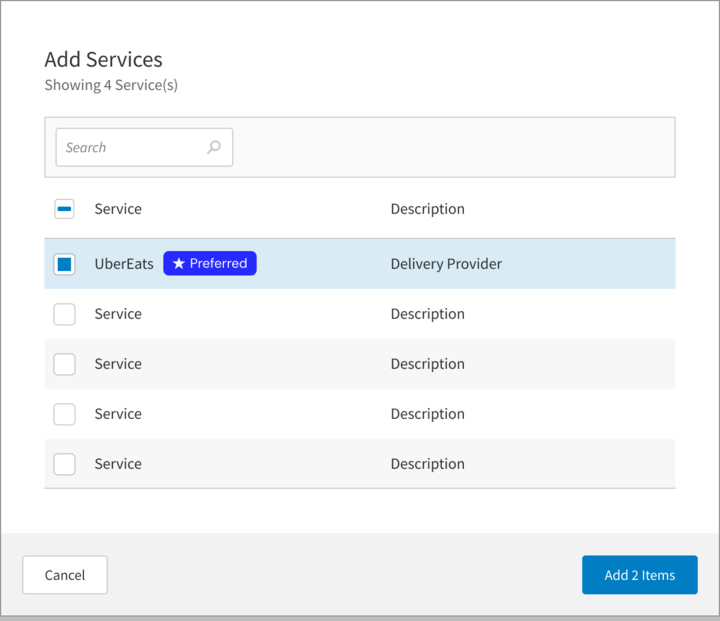
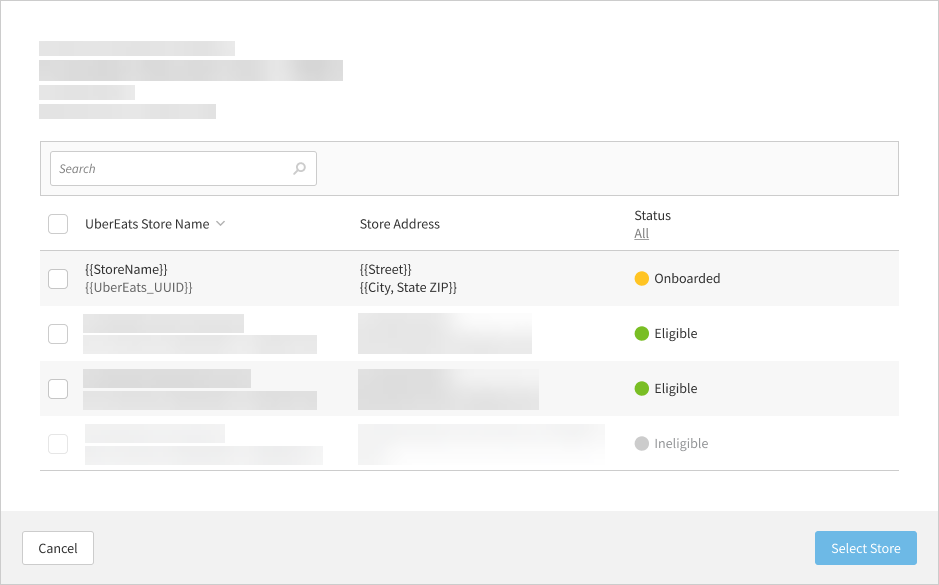
Enhanced store mapping capability for administrators with the following actions:
Add support to subscription for Single Sign On to third-party delivery service
Update third-party service with the following fields in General tab: Uber Eats URL, Callback URL, Service URL, Order Source dropdown
Add the following new toggles: Use Integrated Images, Split Bundle Choices, Map Quantity to Variants
Enhanced onboarding to third-party delivery service with Connect to Uber Eats button in General tab
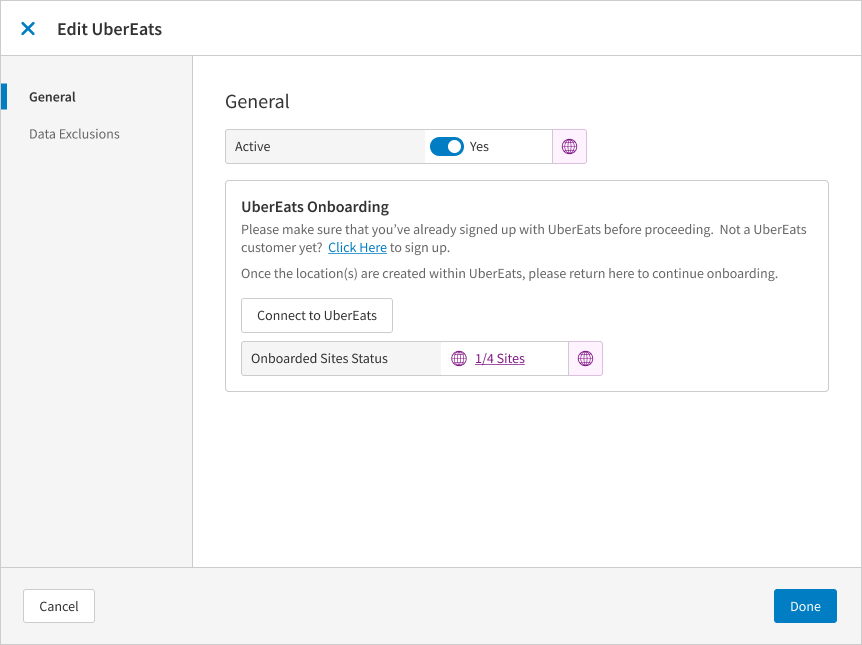
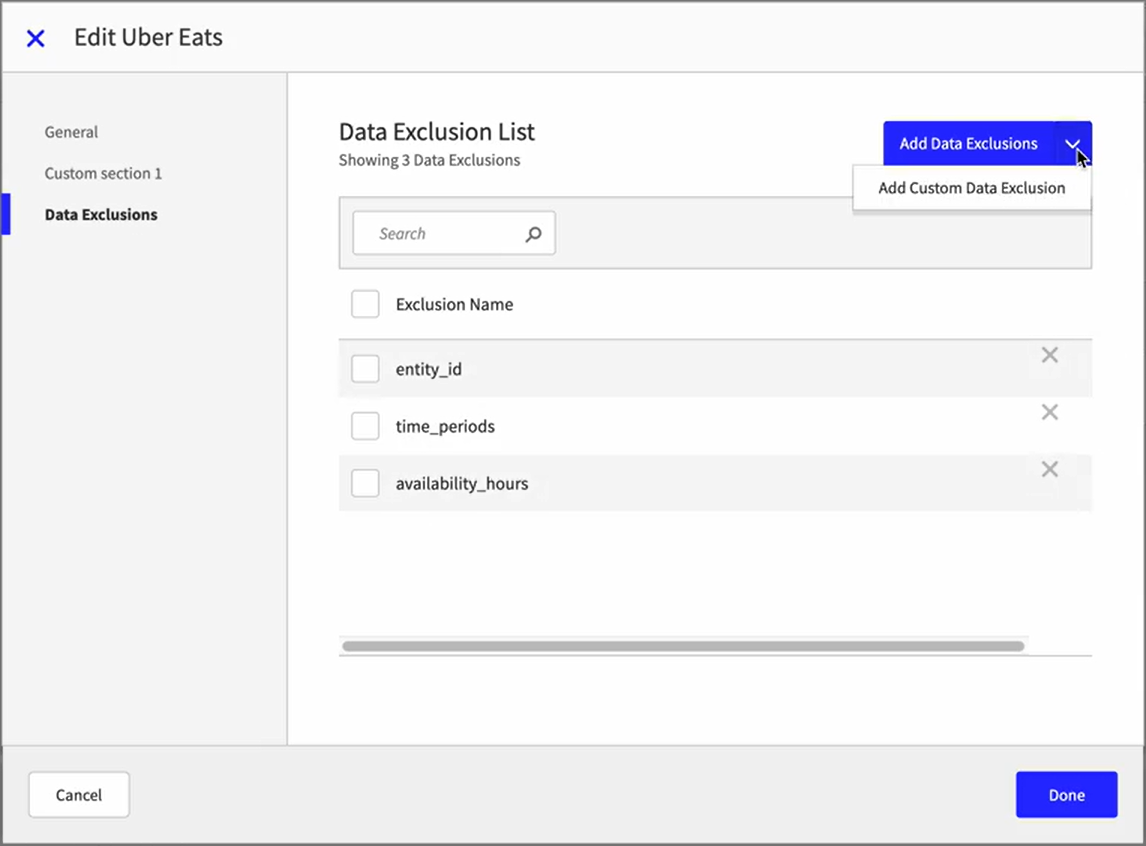
Enhanced Data Exclusion tab with addition of new field Environment with values Use Company Settings and Custom.
Enhanced onboarding status update process for third-party delivery partner stores.
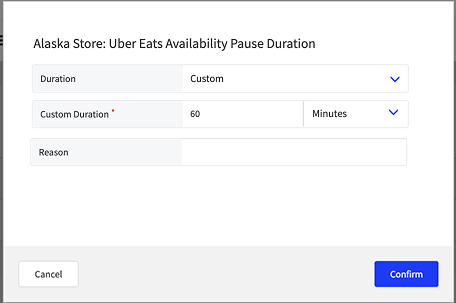
Added ability to pause UberEats connection.
Data Management
Updated schema for Product Availability updates.
Online Ordering
Added support to notify Store when it is activated/deactivated on delivery service platform.
Enabled user to pause and unpause online ordering by consuming new field values is_offline_until from {stack}-delivery-site-status and mapping to corresponding field in delivery service.
Added support for delivery service provider to include PIN with customer phone number by updating to consume PIN value and extend existing customer phone number field.
Enabled pause/unpause notifications to delivery service if alias not provided by adding lookupUbereatsStoreId request.
Added support for notifying delivery service provider when order has been rejected in Store and not released to kitchen.
Enabled externally applied discounts to be included in order by enabling consumption and mapping of discount_info object, utilizing discount_funding_splits array.
Enabled processing of voided order from Point Of Sale and sending cancelation notification via Notifier.
Added support to enable promotion/discount funding splits details to be included in order by injecting discount_funding_splits details as part of Discount object.
Added support for quantity-based pricing for modifiers in delivery menus published to delivery partner.
Added support for delivery service provider to be notified order is canceled in Store by updating to process voided notifications and route to delivery provider.
Enabled order void/cancel request to be sent to Store by sending cancel request when orders.cancel notification is received from delivery partner.
Enhanced standardization of error messages for calls from delivery service provider.
Added support for notifying delivery service Store when order has been canceled by receiving rejected notifications and sending order rejection request to delivery partner.
Added support for delivery service provider to be notified order is ready for pickup or canceled by updating to process order-ready and voided notifications and route to delivery provider.
Added support for delivery service provider to be notified order is ready for pickup or canceled by updating to consume new Data Management configuration.
Enabled population of detailed reason for order cancelation to third-party delivery service.
Added support to enable promotion/discount funding splits details to be included in order by consuming promo_funding_splits details from delivery service provider.
Added support for sending Reason code to delivery service provider for voided orders at Point Of Sale.
Enhanced default build configuration for delivery service provider by zeroing out all quantifiable/non-quantifiable modifier prices with default unit prices greater than zero. Enabled mapping of pricing to delivery charge.
Pipeline
Added new endpoint /ds/pipeline/pos.integratorstatus to route notifications about site activation/deactivation.
Point of Sale
To support time punch synchronization between back office and POS:
Added support for boh-timepunch.delete message from Staff.
Extended PosShiftDetails object with new ShiftId field.
When POS receives store activation status messages from order source, a notification is displayed in event action is required by the POS user.
Reporting
Added support to enable users to view discount funding source in Discount Summary and Discount Detail reports with the following actions:
Add columns Discount Funding-Uber Eats and Discount Funding-Merchant to Discount Summary and Discount Detail reports. Funding source columns are hidden by default
System reads discount_funding_splits array from each entry in discount_map
System handles single funding source (one split entry) and multiple funding sources (multiple split entries)
Online Ordering | Allow Site-Specific Tax Liability
PRMA-6674
Added the ability to manage and apply tax liability on the location level for Online Ordering from Data Management.
Affected Components:
Data Management
Online Ordering
Data Management
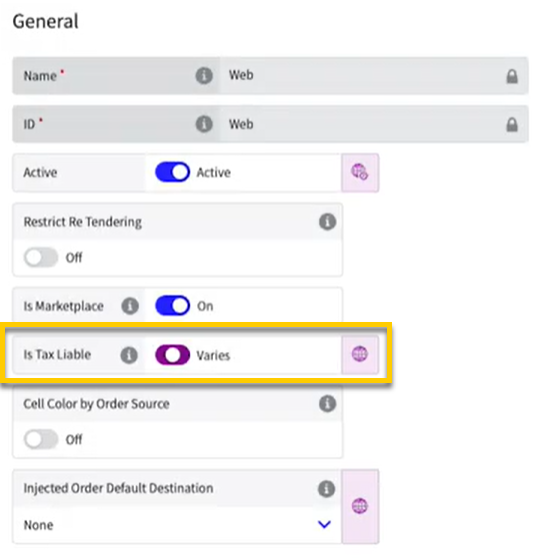
Added Is Tax Liable setting to Order Source form to enable/disable some or all taxes on behalf of the merchant. Setting is disabled by default for newly created Companies and Sites.
 |
Online Ordering
Added the ability to manage and apply tax liability on the location level from Data Management.
POS & Data Management | Product Availability
PRMA-5301
From Product List and Modifier List in Data Management, you can now view and edit the status of a product's availability at multiple sites at the same time.
You can also control whether users at the POS can update the availability status of specific products.
Affected Components:
Cloud Portal
Data Management
Point of Sale (POS)
Reporting
Cloud Portal
Permission | Key | Description |
|---|---|---|
View Product Availability | product-availability.view | Allow viewing of product and modifier availability in Data Management |
Manage Product Availability | product-availability.manage) | Allow updating product and modifier availability in Data Management |
Permission | Key | Description |
|---|---|---|
Product Availability | reporting.product.availability | Allow viewing of Unavailable Products Report |
Data Management
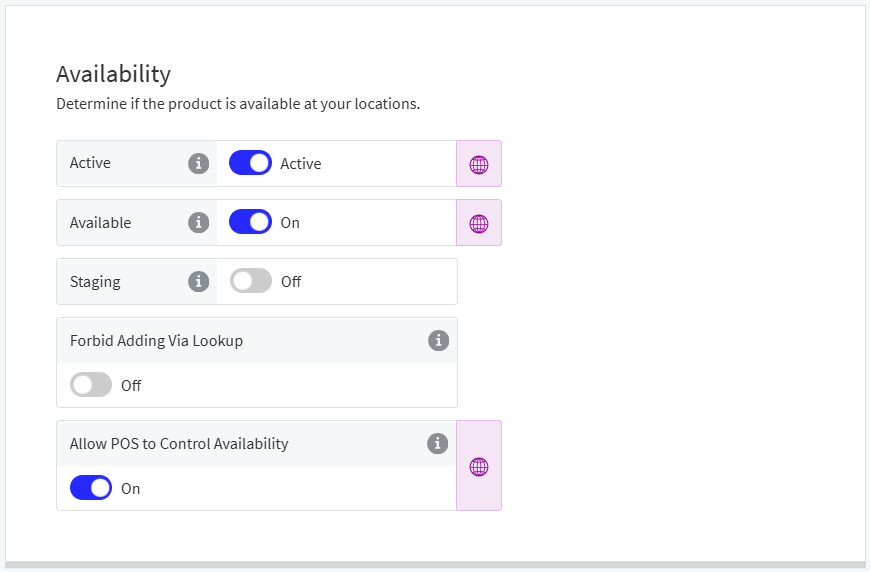
From the Availability section of Product List and Modifier List, define the following settings for a product/modifier:
 |
Setting | Description |
|---|---|
Active | Toggle Active if the site sells the product when available. |
Available | Toggle On if the product is currently "Live" at the site. Toggle Off if the product is NOT available at this site ("86" this item). |
Forbid Adding Via Lookup | Toggle On to prevent POS users from adding the product to an order from the Product Lookup screen. |
Allow POS to Control Availability | Toggle On to allow POS users to update the availability status of the product from Product Details. Toggle Off to NOT allow POS users to update the availability status of the product. |
Next to the Available field, select the globe icon to open the Product Availability form.
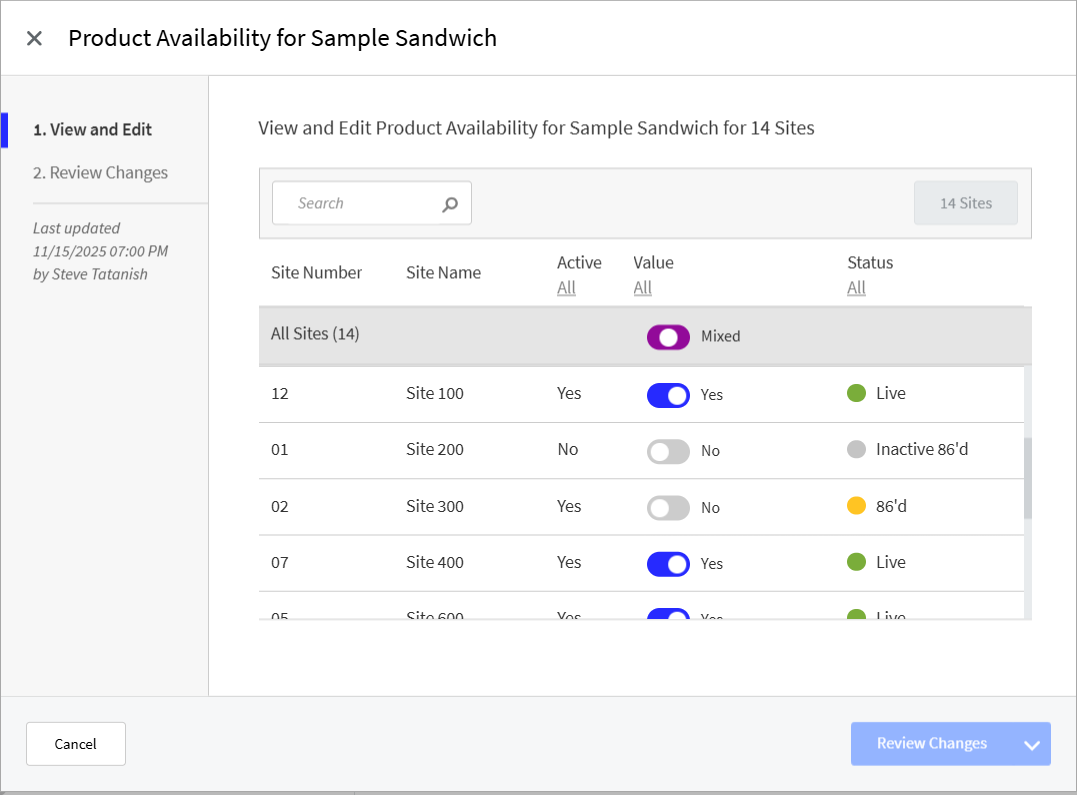 |
The Product Availability form indicates a product's Active state and its availability status at each listed site.
The Active state of a product determines if a site sells the product when available.
The Status of a product's availability determines if the product is currently "Live" at a site, or if it is "86'd".
When a product is "86'd", it cannot be added to an order at the POS.
Use the Value toggle to adjust the Status of a product's availability at a site.
Status | Active | Available |
|---|---|---|
Live | Yes | Yes |
86’d | Yes | No |
Inactive | No | Yes |
Inactive 86’d | No | No |
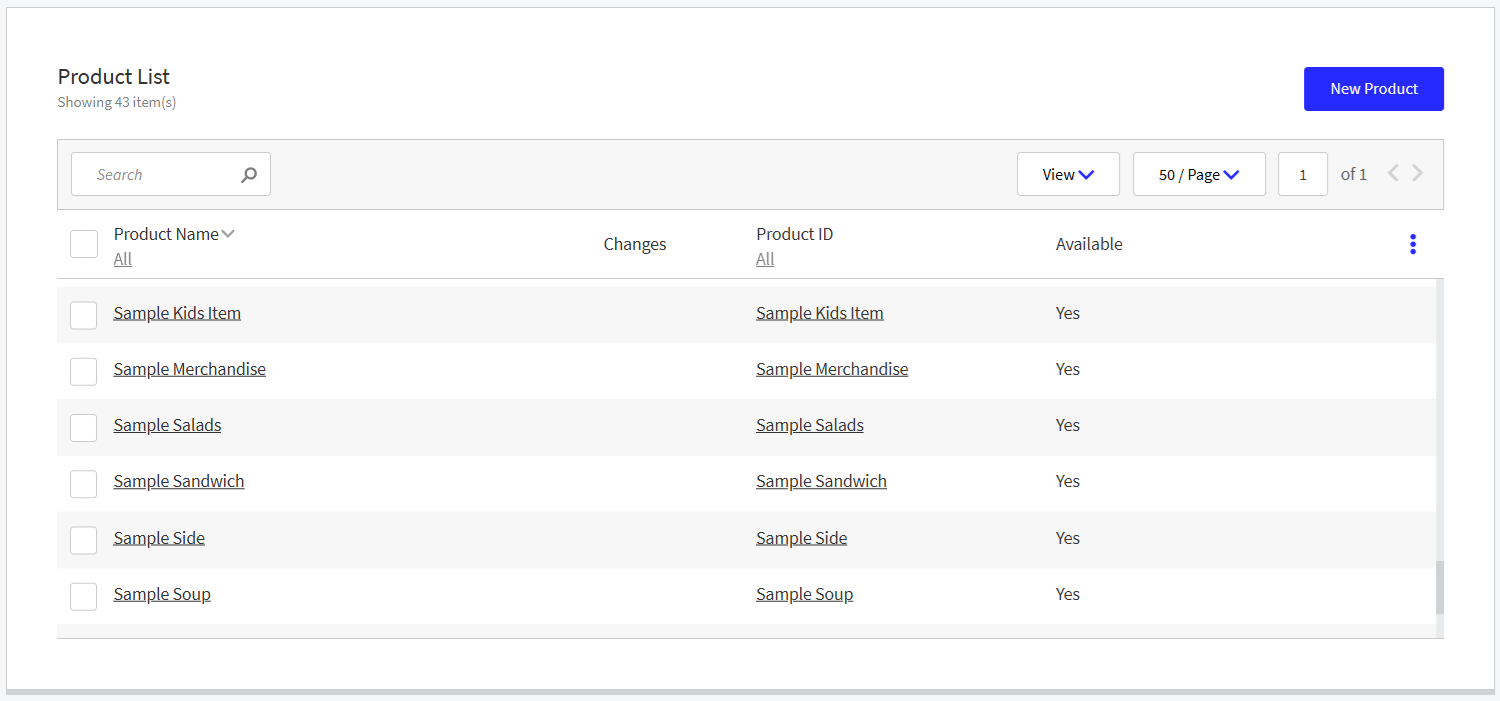
Optionally add an Available column to the Product List and Modifier List homepage to view product availability:
 |
Point of Sale (POS)
When product availability is updated in Data Management, it is automatically updated at the POS. The POS user is not required to Refresh Data.
When product availability is updated at the POS, the update is automatically sent to Data Management.
Reporting
Name | Description |
|---|---|
Identifies unavailable products by site |
Point of Sale (POS) | POS USB Serial Support
PRMA-6397
Implemented support for USB serial communication on Point of Sale (POS).
Affected Components:
Point of Sale (POS)
Point of Sale (POS)
Support seamless USB serial communication between POS and Genius/GPI System (Payment Platform).
Point of Sale (POS) | Drawer Session Number on POS Order Object
PRMA-6945
Added Drawer Session Number to Point of Sale (POS) Order Objects to improve sequencing of Drawer Events.
Affected Components:
Cloud Portal
Pipeline
Point of Sale (POS)
Cloud Portal
Added Preserve Strict Event Order to Data Stream Endpoints - Drawers tab to enable/disable sending drawer events in strict order to this target address
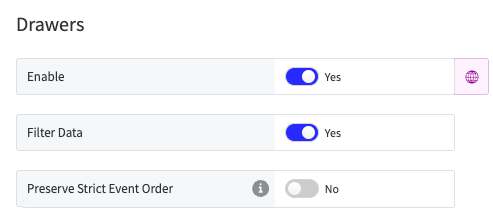
Extended site subscription to include
preserve_event_orderflag
Pipeline
Added TillID tag to order xml files.
Point of Sale (POS)
Drawer Session Number is now included in Order Object to allow integrators to consume Drawer Session Numbers from Data Streams.
Reporting | Rounded Adjustments
PRMA-7095
Implemented Rounded Adjustments in Reporting to represent the difference between exact transaction amount and rounded amount collected. Rounded Adjustments are the sum of all cash rounding adjustments for the specified period and can be positive or negative.
Affected Components:
Reporting
Reporting
Enabled user to retrieve rounded adjustment data from Calculated Statistics API and Order Payments API by adding new rounded_adjustment field to Payments section of both API responses.
Staff | Synchronize Punches Updates
PRMA-5275
Synchronized punch updates from Staff to data from Point of Sale (POS).
Affected Components:
Cloud Portal
Point of Sale (POS)
Staff
Cloud Portal
Renamed Staff.ExtendedShiftData.View permission to Staff.ExternalShiftData and changed permission description to Allows managing information regarding employee shift details with additional configuration information for external systems.
Point of Sale (POS)
To support time punch synchronization between back office and POS:
Added support for boh-timepunch.delete message from Staff.
Extended PosShiftDetails object with new ShiftId field.
Staff
Improved Punch Edit functionality by enhancing PosShiftDetails logic to disallow recreation of a previously deleted shift. Error message displays in such instances.